Gamma Tech founder Bradd Konert named to Business Observer’s 40 Under 40 class of 2026
Recognition highlights the Naples technology company’s growth from a teenage computer repair business to a 10,000-square-foot headquarters.
NAPLES, Fla. (Oct. 8, 2026) -- Business Observer has named Bradd Konert, founder and president of Naples-based Gamma Tech Services, to its 40 Under 40 class of 2026, which recognizes young business leaders across Florida’s Gulf Coast.
Bradd Konert, founder and president of Gamma Tech Services.
The annual list honors leaders under 40 from Tampa Bay to Naples for accomplishments that range from patents to community-shaping real estate projects to leading some of the region’s best-known organizations.
Konert started the computer repair business that became Gamma Tech in 2004, at age 16, running it largely out of his car. The company now operates from a 10,000-square-foot headquarters in Naples and serves homeowners and more than 110 businesses across Southwest Florida with managed IT, cybersecurity, audio-video and business phone systems. Gamma Tech was also named to the 2026 MSP 501, a global ranking of managed service providers.
The Business Observer profile, written by Beth Luberecki, traces Konert’s focus on integrity to his early years repairing computers for older customers who had little experience with technology.
“Building trust with people is something that’s earned,” Konert said in the profile.
Konert credits the people who joined him along the way for the company’s growth. The first and third employees he hired still work at Gamma Tech. The company’s stated mission is to restore joy and trust in technology, especially for people who have had bad experiences with it.
“I just love technology; it is annoying how much I love it,” Konert said.
The Gamma name stands for “God anticipates my many actions.” Konert credits his longtime mentor and former youth pastor, Todd Milby, with shaping the character he built into the business.
Gamma Tech Services is a family-owned technology company based in Naples, Fla. Founded in 2004 by Bradd Konert, the company serves homeowners and more than 110 businesses across Southwest Florida with managed IT, cybersecurity, business phone systems, AI and custom apps, commercial audio-video and security, and home technology including home theater, whole-home audio, smart home automation, lighting control and motorized shades. Gamma Tech was named to the 2026 MSP 501. Learn more at www.gammatechservices.com.
A layer of light is a group of lights chosen to do a particular job in a room. One group may provide enough light to move around comfortably, another may light the counter where you prepare food, and a third may draw attention to artwork. Each group contributes something useful, and you can adjust their brightness together or separately to suit what you are doing.
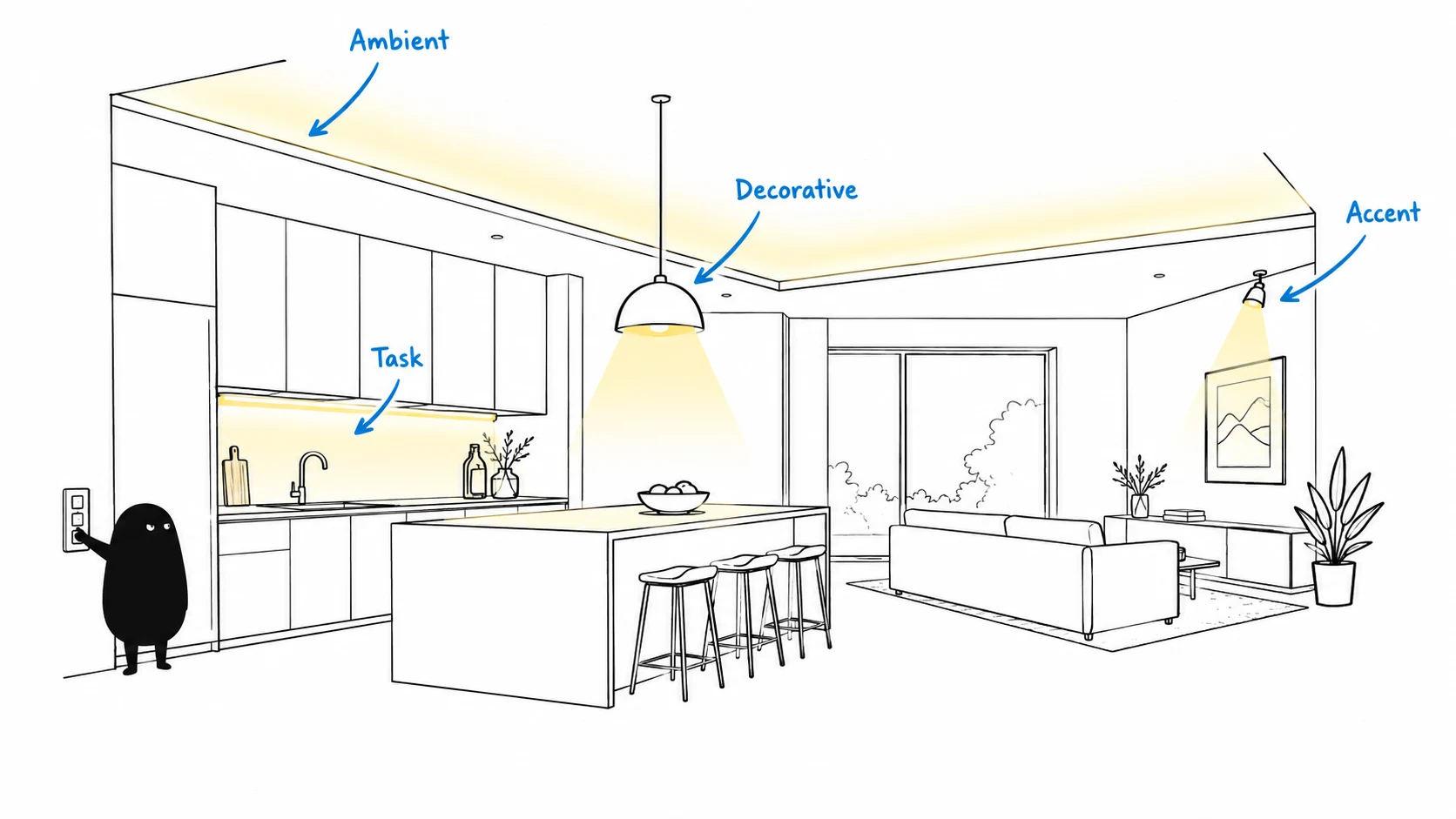
Picture a kitchen with recessed ceiling lights, lights beneath the cabinets and pendants above the island. The ceiling lights help you see across the room, the under-cabinet lights illuminate the work surface, and the pendants add character while lighting the island. Each source has a role, and some fixtures serve more than one purpose. Those roles give us four useful categories.
The four layers of light
Ambient light provides the room's general illumination. Recessed downlights and indirect cove lighting are common examples. Look at the spaces between the fixtures as well as the ceiling itself: a comfortable route across the room matters as much as a bright spot directly beneath a downlight.
Task light helps with a specific activity. Under-cabinet lighting serves a kitchen counter, a reading light serves a chair, and vanity lighting serves the person standing at the mirror. The useful question is whether the light reaches the work surface while someone is actually using it. Standing between a ceiling light and a cutting board can put your own shadow across the area you need to see.
Accent light highlights art, stone, shelving or architectural details. Decide what deserves attention, then check the result from the doorway and your usual seating position. A bright reflection in the glass over a painting can compete with the artwork itself.
Decorative light gives the fixture a visible role in the design. Chandeliers, pendants and sconces can help establish the character of a room while also contributing useful illumination. A pendant over an island may provide decorative and task light at the same time; the categories describe what the light does.
The four layers serve different purposes, and a single fixture can contribute to more than one layer.
Bring the room to life
Layers of paint bring a painting to life as the artist builds up color, highlights and shadows, and layers of light bring that same sense of depth to your home. A flat wash of one color can leave a painting without much dimension, and a room lit by a single overhead source can feel similarly flat. The floor may be bright while the artwork fades into the background, the reading chair sits in shadow and the counter becomes difficult to see beneath your hands.
Adding light where it has a purpose brings those parts of the room into focus. A reading light makes the chair useful, a carefully aimed accent reveals the artwork, and under-cabinet lighting gives you a clear view of the counter. Adjusting the balance lets the room feel different during cooking, dinner and a quiet evening. Placement, aiming and brightness all contribute to the result.
Plan from the room's activities
A floor plan becomes more useful once you mark where people will sit, read, cook and move through the home. Furniture, cabinets and artwork give the lighting designer specific targets, and each target deserves a check from the position of the person using it. These examples are planning exercises you can apply to your own rooms.
Kitchen: Mark the preparation counter, sink and island seating separately. Check counter lighting with someone standing in the normal working position, then look for reflections on the countertop and visible light sources from an island stool.
Living room: Plan a light for the reading seat, softer general illumination for conversation and a separate highlight for a feature you enjoy. Sit facing the television to check whether a fixture or window creates a distracting reflection.
Bathroom: Evaluate the mirror while standing at it. Light that makes the floor bright may still leave shadows across your face, so include the mirror position in the fixture discussion.
Bedroom and hallway: Plan bedtime reading and the route to the bathroom. Review which lights you can reach from bed and how a nighttime setting can preserve visibility without lighting the entire room at daytime levels.
Lanai and arrival: Include the approach to the door, steps and outdoor seating in the plan. Check the view outward from inside after dark, because interior reflections can affect how clearly you see through the glass.
Brightness, color and dimming are separate decisions
Brightness describes how much light you get, while color temperature describes the appearance of white light. Lower Kelvin values look warmer and higher values look cooler. A fixture's lumen rating describes its light output; the light that reaches your counter also depends on placement, beam distribution and the room's surfaces. A lighting professional can evaluate the working area directly and interpret the fixture rating in the context of the room.
Dimming reduces brightness. A standard fixed-color LED can become dimmer while keeping approximately the same white appearance. Warm dim products are designed to become warmer as they dim, and tunable white products allow the white appearance to change within their supported range. The fixture, driver and control system determine which adjustments are available.
Lutron's Lumaris programming documentation shows how compatible tape lighting can participate in time-based settings in RadioRA 3 and HomeWorks QSX. Reading those examples can help you describe the effect you want, but the design still needs to confirm the exact equipment and supported features. A regular dimmer alone will not add color tuning to a fixed-color light.
Use scenes to make the layers easy to live with
A scene recalls a group of light settings together. You can choose Cooking or Dinner with one control, and the planned layers respond together. Lutron's RadioRA 3 overview explains the control approach; Gamma also has a guide to panelized, wireless and digital lighting control for comparing the underlying systems.
The worksheet below gives activity goals for each lighting scene. Actual settings need to be tested in the finished room because fixtures, finishes and personal preferences change the result.
Example scene worksheet for a kitchen and adjoining living room
Scene
Layers to emphasize
Check in the room
Cooking
Clear task light on counters, with enough ambient light for movement
Can you see the preparation area clearly with someone standing at the counter?
Dinner
Comfortable light at the table, softer general light and selected accents
Can you see faces and food comfortably without a bright source in your eyes?
Goodnight
Low-level route lighting where needed, with other layers reduced or off
Can you find the hallway and bathroom controls and see changes in floor level?
Simple engraved keypad labels make the scenes easier for family members and guests to use. A reliable plan also includes a clear way to raise the lights for cleaning or change a scene that no longer suits your routine. Discuss the normal behavior after a power interruption during commissioning.
Daylight belongs in the lighting plan
A room's daytime lighting changes as the sun moves, and windows can introduce glare even while they provide useful illumination. Review where the sun falls during the times you use the room, then coordinate shades with the electric lighting. Lutron's guide to layered window treatments explains how shades can manage daylight within the ambient layer.
Review the room with shades open and closed, then repeat the check after dark. A lighting scene that feels comfortable at noon may need different settings in the evening. The goal is to make the usual transitions easy without requiring constant adjustments.
Plan during construction and test before installation
Construction planning gives your team the opportunity to coordinate fixture locations, ceiling details, coves, cabinetry and keypad positions before drywall goes up. Decorative fixtures should be selected early enough to confirm their dimensions and control requirements. Drivers and other serviceable components also need accessible locations so future maintenance has been considered.
A sample test can reveal problems that a specification sheet misses. Ask the team to demonstrate the proposed fixture, driver and dimmer together at bright, medium and low settings. Look for flicker, listen for noise and check whether the light starts and dims smoothly. Lutron's LED compatibility tool is useful for checking tested bulb and dimmer combinations; integrated fixtures also require their exact driver and control specifications to be verified.
Finish the installation with a walkthrough from the places you actually use. Sit on the sofa, stand at the mirror and walk into the room after dark. Aiming fixtures and refining scenes at that stage helps turn a sound plan into lighting that works naturally in the home.
Try a lighting exercise tonight
You can learn a great deal with the lights already in your room. This observation exercise helps you identify what to discuss with a designer and requires no electrical changes.
Choose one room and one activity, such as reading on the sofa or preparing dinner.
Use your normal light setting and notice the work surface, your view across the room and any reflections or shadows.
Change one existing light at a time. Try a table lamp or under-cabinet light and observe what changes before adding another source.
Write down the result in plain language: “The counter is clearer,” “The lamp reflects in the television,” or “The artwork disappears after sunset.”
Repeat the check at another time of day and bring the observations to your planning meeting.
Those observations give your team a useful starting point. You can also download the one-page lighting worksheet to record room activities, glare checks and the scenes you want.
A useful brief for your lighting team
List the activities each room needs to support in the morning, evening and late at night.
Mark the furniture, work surfaces, art and architecture you want the lighting to serve.
Choose decorative fixtures early and check their control requirements.
Plan keypad locations around your usual routes through the home.
Include exterior lighting, daylight and shades in the discussion.
Ask for a fixture-and-control sample test, followed by a finished-room scene walkthrough.
Our Naples experience center brings cove lighting, recessed downlights and lit shelving together, giving you a place to see how the layers interact. Gamma Tech designs layered lighting and Lutron lighting control for homes in Naples, Marco Island and across Southwest Florida. Explore our lighting control and design services or arrange a visit to talk through the rooms you are planning.
Gamma Tech · Southwest Florida
Panelized, Wireless or Digital? Lighting Control Explained
Planning a new home or a major remodel in Naples usually means hearing three unfamiliar phrases from your architect, builder or lighting designer: panelized lighting, wireless lighting control and digital addressable lighting. All three let you set scenes, dim lights and control your home from an app. The difference is how the lights are wired and controlled behind the walls. Here is what each one means in plain language.
With a panelized system, the lighting circuits in your home run back to a central lighting panel, usually in a utility room or equipment closet. The dimming happens in that panel. The keypads on your walls simply send commands, so a single slim keypad can control a whole room of lights.
The result is the cleanest look on your walls. A hallway that might need six switches can have one engraved keypad instead. Panelized lighting is the most common choice for new construction and larger luxury homes, because the wiring is planned from the start and the system is easy to service from one location.
Best for: new construction, large homes and homeowners who want the fewest controls on their walls.
Wireless lighting control: smart dimmers that talk to each other
A wireless system uses smart dimmers and keypads that fit in the same wall boxes as ordinary switches. Each dimmer controls the lights wired to it and communicates with the rest of the system over a dedicated, reliable wireless signal.
Wireless control uses your existing wiring, which makes it the natural way to add scenes, schedules and app control to a finished home. We can upgrade room by room with little disruption to walls, ceilings or finishes.
Best for: existing homes, remodels and projects where opening walls is not practical.
Digital addressable lighting: every fixture on its own
Digital addressable lighting gives each light fixture its own digital address. Fixtures share a control wire, and the system can talk to each one individually. A single circuit can hold many fixtures, and each can be dimmed, grouped and regrouped in software.
With compatible fixtures, digital control can also adjust the color of the light, from crisp daylight in the morning to warm candlelight in the evening. Lighting designers often use it in signature spaces such as great rooms, art walls and kitchens where precise control matters most.
Best for: signature rooms, art lighting and tunable white or color lighting.
Many homes use more than one
These approaches work together. A new home might use a central panel for most rooms, digital fixtures in the great room and wireless controls in a guest house. Every option works with the same keypads and the same app, so the system feels like one home to the people living in it.
How to choose
The right answer depends on whether you are building or upgrading, how many controls you want on your walls and how much control you want over each fixture. The best time to decide is during construction planning, before the walls are closed and the wiring is set.
Our team designs Lutron lighting control and integrates it with your Control4 or Crestron Home smart home. Visit our lighting control and design page to see how we work, or call (239) 330-4939 to plan your lighting with our Naples team.
Gamma Tech · Southwest Florida
Gamma Tech Celebrates 2026 MSP 501 Recognition
Gamma Tech celebrates its place on the 2026 MSP 501 at the September 30 awards gala in Orlando.
Celebrating Gamma Tech’s 2026 MSP 501 recognition at the September 30 awards gala in Orlando.
Gamma Tech has been named to the 2026 MSP 501, placing No. 456 on the annual global ranking of managed service providers. The Naples-based company celebrated the recognition at the MSP 501 Awards Gala on September 30 at Loews Royal Pacific Resort in Orlando.
The recognition belongs to the people who support our clients every day. Our technicians, engineers, project teams, and support staff work together to help businesses keep their technology dependable, protect their information, and plan for what comes next. We are grateful to our team and to the clients who continue to trust Gamma Tech with their businesses.
The MSP 501 evaluates managed service providers on financial performance, operational efficiency, and business health. The program considers sustainable growth, recurring revenue, and profitability as part of its assessment. Gamma Tech’s inclusion places the company among the 501 providers selected for the 2026 list.
A managed service provider supports a business’s technology on an ongoing basis. For Gamma Tech, the work includes IT support, cybersecurity, and helping clients make practical decisions about the systems their teams rely on.
Built in Naples, serving Southwest Florida
Bradd Konert started Gamma Tech in 2004 at age 16. The company has grown into a team serving homes and businesses across Southwest Florida, with services that include managed IT, cybersecurity, audio and video, and connected-home technology.
Gamma Tech’s purpose is to restore joy and trust in technology. Earning a place on the MSP 501 is a meaningful milestone as our team continues the daily work of caring for clients, solving problems, and building lasting relationships.
Thank you to our Gamma Family, our clients, and the partners who support our work.
Approvals pile up when no one owns the IT decision structure. Helpdesk tickets, cloud systems, vendors, routers, firewalls, endpoints, and software renewals keep moving, but the business lacks one clear view of cost, risk, and priority.
That is why the question “what is a vCIO?” matters. IT spending, security exposure, and user productivity affect daily operations, not just back-office systems. At Gamma Tech Services, we focus on guidance that fits real users, real vendors, and real deadlines.
Bradd Konert, President of Gamma Tech Services at Gamma Tech Services, notes: "A useful IT roadmap starts with the tickets, invoices, access requests, and renewals already on your desk, then turns them into clear decisions."
A vCIO is a part-time or outsourced senior IT advisor who helps leadership make better technology decisions without hiring a full-time executive. The role connects spending, security, cloud planning, and user productivity to business priorities. That matters when access decisions create measurable risk; 53% of respondents identify lenient identity and access management as a top challenge.
Support versus strategy: Helpdesk fixes the locked laptop. Advisory work asks why lockouts keep hitting payroll and whether onboarding, access policies, or aging devices are driving repeat tickets.
Budgets follow users: Our per-user model supports planning around how employees work across devices, applications, and locations.
Renewals need ownership: Software invoices, vendor terms, and cloud seats get reviewed before approval deadlines arrive.
Security gets prioritized: Firewall, access, and endpoint decisions are ranked by operational risk, compliance needs, and user impact.
What Does A Virtual CIO Do Across Daily Operations
Leadership often approves IT invoices, software subscriptions, firewall changes, and hardware purchases without one roadmap. A virtual CIO connects those decisions to daily operations, using what our helpdesk, network, cloud, and cybersecurity teams see in tickets, alerts, renewals, and stalled projects.
Builds practical IT budgets: Replacement laptops, VoIP renewals, cloud licenses, and support needs move into a forecast, reducing surprise approvals.
Manages vendor follow-through: Carrier tickets, software escalations, renewal dates, and support delays get tracked against service impact.
Plans security priorities carefully: Over one in three Google Cloud VMs, or 33%, have sensitive permissions to a project, so access reviews need business ownership.
Guides cloud decisions: IAM misconfigurations were the initial access vector in about 4% of cases, which makes setup details worth reviewing before migration, expansion, or vendor handoff.
Turns tickets into projects: Recurring Wi-Fi, patching, application, or login complaints become scoped work with timing, cost, user impact, and ownership defined.
Why A Virtual CIO Is Not The Same As Helpdesk Support
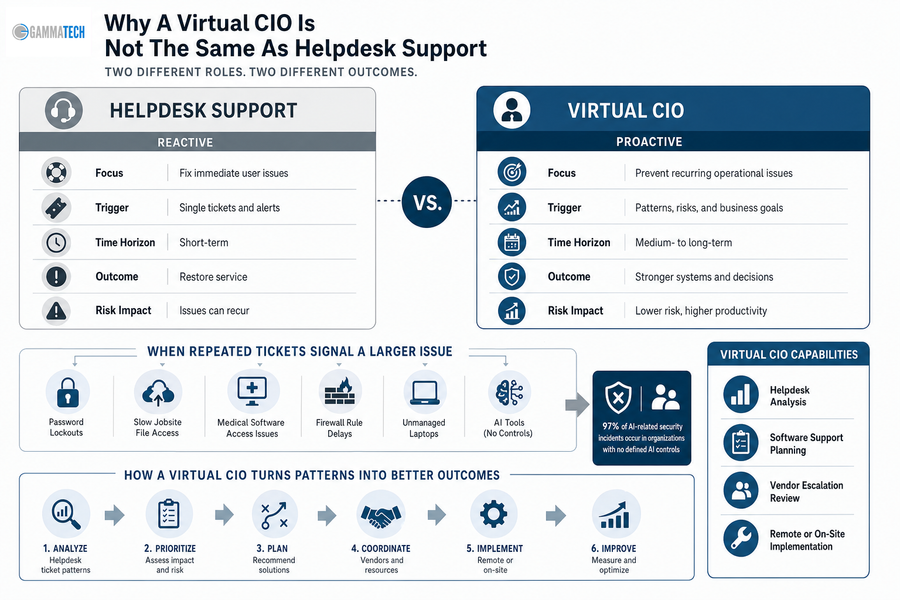
Helpdesk support fixes immediate user problems, while executive IT guidance helps prevent recurring operational issues from becoming budget, security, or productivity problems. Our technicians and account managers stay approachable and detail-oriented, but repeated ticket patterns need a planning layer.
If users keep reporting password lockouts, slow jobsite file access, medical software access issues, firewall rule delays, or unmanaged laptops, the issue is larger than one ticket. The same applies to AI tools, where 97% of AI-related security incidents occur in organizations with no defined AI controls. Friendly support matters, and so does turning the pattern into an accountable decision.
That is where what is a virtual CIO becomes a practical operating question.
Capabilities include helpdesk analysis, software support planning, vendor escalation review, and remote or on-site implementation.
What Is A Virtual CIO When Security And Cloud Risk Grow
Security, cloud, and network choices become executive issues when they affect insurance requirements, compliance, remote access, billing systems, customer trust, or productivity. We treat those choices as risk management, including whether cloud firewall planning belongs on this year's roadmap, as 24% of respondents plan to move primarily to cloud firewalls over the next two years.
Firewall oversight: Managed firewall and router reviews reduce unclear rule changes, document approvals, and prevent one-off requests from becoming permanent exposure.
Patch and endpoint control: Patch management, antivirus, and endpoint protection reduce preventable tickets from unmanaged laptops, missed updates, and unsupported devices.
Cloud access discipline: 76% of organizations don't enforce MFA for console users, and 58% don't enforce MFA for root or admin users, making access ownership a business issue.
Response planning: Anti-phishing, mobile device security, ransomware planning, and testing clarify who acts when alerts appear and which systems take priority.
Turn IT Decisions Into A Clear Roadmap
If vCIO planning is the next step, Gamma Tech Services can help align your IT priorities, risk, vendors, and budget decisions.
Building A vCIO Roadmap That Leadership Can Actually Use
Change is difficult because users still need support, vendors still send invoices, and leadership still has to approve spending while projects are underway. We build roadmaps around your software, approvals, vendors, users, and budget timing, rather than forcing your team into a rigid template.
Inventory systems and vendors: List applications, contracts, routers, firewalls, cloud platforms, support contacts, and renewal dates.
Review recurring tickets: Slow VPN access deserves attention when nearly half, or 46%, of VPN clients are misconfigured or out of date.
Map security gaps: Since 75% of organizations have consolidated some security tools or policies, decide where central management improves oversight.
Set quarterly reviews: Revisit cost, timing, implementation status, vendor performance, and open helpdesk trends before small delays become stalled work.
Talk With Gamma Tech Services About Your Next IT Decision
A clear IT decision structure gives you better planning, cleaner vendor accountability, stronger security priorities, and less strain on internal teams handling tickets, approvals, and renewals.
At Gamma Tech Services, we bring a 20-year local track record and a warm, practical service style to managed IT, cybersecurity, cloud, helpdesk, vendor management, and vCIO Services. If your next technology decision starts with tickets, invoices, access requests, and renewals, contact us for a grounded conversation about what should happen next and what can wait.
Ticket volume rises when systems do not share data, cloud choices sit unresolved, and security reviews add steps to every approval. Leaders evaluate the benefits of IT consulting because internal teams are often handling vendor coordination, user support, software administration, and access requests at the same time.
Bradd Konert, President of Gamma Tech Services at Gamma Tech Services, notes: "Good consulting starts by finding where approvals, tickets, vendors, and security controls slow the business, then turning those findings into clear next actions."
Cybersecurity is a clear driver, with 60% of respondents naming it the top challenge that led them to work with an MSP. IT services spending reached $1.59 trillion in 2024, reflecting a practical need: experienced guidance that turns security reviews, cloud decisions, vendor follow-up, and support workflows into manageable work.
Benefits Of IT Consulting Services For Daily Operations
Consulting value is clearest when routine workflows become easier to manage.
Cleaner ticket triage: Repeated password resets, printer issues, and application errors get sorted by root cause.
Predictable user support: Access requests, device questions, and application needs follow a consistent path for each employee.
Stronger vendor follow-up: Renewals, failed integrations, and billing questions do not sit between managers, vendors, and unresolved tickets.
Better software administration: The benefits of consulting in IT include clearer planning when teams use multiple devices or applications, which fits our per-user model better than endpoint-based service assumptions.
What Are The Benefits Of Hiring IT Consulting Services?
You need examples tied to real workflows, not abstract IT theory.
In a healthcare setting, the benefits of hiring an IT consulting service appear when a new clinician needs access to scheduling, records, and secure file sharing before the first shift.
Outsourcing data shows 65% of organizations use outside partners to keep teams focused on core business, 53% address capability gaps, 24% buy speed and efficiency, and 18% seek senior expertise.
Cost reduction still leads at 63%, but our work with healthcare and construction software reinforces another point: clean handoffs reduce disruption when access, files, invoices, or project records cannot wait.
Benefits Of An IT Consultant For Stronger Decisions
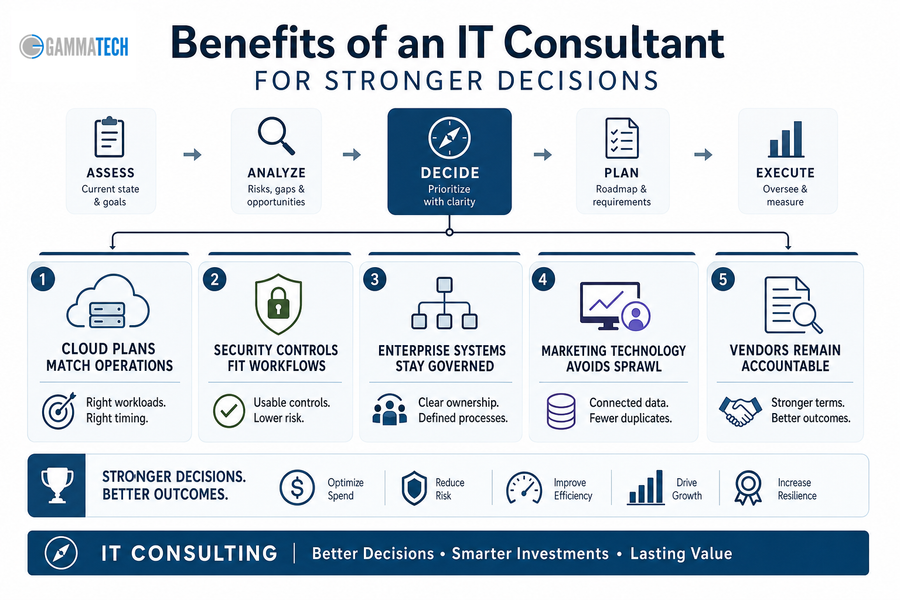
Consulting improves decision quality before spending becomes contracts, migrations, or long-term support obligations. The benefits of hiring an IT consultant come from clarifying workflows, then moving implementation forward with the right owners, controls, and vendor expectations.
Cloud plans match operations: Service providers spent $65.6 billion on compute and storage infrastructure in 4Q24, up 103.9%. Our Cloud Consulting helps you decide what belongs in the cloud before invoices multiply and support responsibilities blur.
Security controls fit workflows: With 60% naming cybersecurity as the top MSP driver, our Cyber Security Consulting turns policy into usable controls for sign-ins, devices, permissions, and support tickets. Another analysis notes that 40% of organizations are turning to fully managed security services for operational technology.
Enterprise systems stay governed: Our Enterprise IT Services clarify data owners, approval paths, and support expectations.
Marketing technology avoids sprawl: Our Marketing IT Services connect forms, CRM fields, and campaign data to reduce duplicate records and reporting delays.
Vendors remain accountable: IT services spending has reached $1.59 trillion, so vendor promises need review before they become long contracts or support gaps.
Change is difficult because approvals, user habits, budgets, and security reviews move at different speeds. A migration can be technically sound and still frustrate staff if invoice workflows change before access, training, or support ownership is ready. We set realistic expectations around timing, cost, and implementation so change does not depend on optimism.
We help turn that change into sequenced work people can follow.
The benefits of IT consultants show up across digital transformation, cloud migration, software administration, cybersecurity improvements. IT services spending reached $1.59 trillion, while 65% outsource to keep teams focused and 53% close capability gaps.
Clarify Your Next IT Move
Turn workflow friction, vendor gaps, and security questions into a practical IT plan with Gamma Tech Services.
Benefits Of Hiring An IT Consultant Before Problems Scale
IT improvements fail when teams skip discovery, ownership, communication, and follow-through. The benefits of IT consulting services come from disciplined troubleshooting paired with clear conversations, so people know where to send requests, who approves changes, and what happens next.
Review ticket patterns: Group recurring issues by root cause, such as login failures, application errors, or repeated escalations.
Map approval workflows: Identify who approves new users, software purchases, file access, urgent exceptions, and vendor changes.
Name software owners: Assign owners for scheduling, project management, accounting, and shared file systems.
Check security handoffs: As 40% of organizations turn to fully managed security services for operational technology, clarify which cybersecurity gaps stay internal, which need outside coverage, and how support handoffs work.
Benefits Of Consulting In IT For Cost Control
The benefits of IT consulting support cost control by improving how decisions are made, not by reducing every discussion to hourly rates. Duplicate tools, unused licenses, rushed escalations, and poorly timed cloud or enterprise system purchases all create avoidable spend. Our per-user model gives you clearer planning when one employee uses a laptop, phone, tablet, and multiple business applications.
Cost matters, with 63% citing cost reduction as the top software development outsourcing driver, and small and medium businesses finding third-party cloud platforms 40% more cost-effective than in-house systems.
Cost control improves when you can see users, tools, invoices, and support demand in one operating picture.
Benefits Of IT Consultants When You Need A Practical Partner
The benefits of hiring IT consultants should show up in better decisions, cleaner workflows, stronger security controls, and fewer recurring support issues across tickets, approvals, software changes, and vendor handoffs.
At Gamma Tech Services, we bring a 20-year track record, warm technician and account manager support, and a practical service mindset to IT consulting, digital transformation, cloud, cybersecurity, enterprise systems, marketing technology, and professional services IT support. If you need guidance that fits how your people actually work, contact us today. Let's help you sort priorities and plan the next step.
Creating a business IT plan matters because your systems touch approvals, customer records, invoices, support tickets, vendor portals, and employee workflows every day. When those connections are unclear, small delays become rework across billing, service delivery, reporting, and customer handoffs.
A practical IT business strategy turns technology choices into operating decisions, so you know what to fund, who owns each platform, and how data moves between teams. A recent Gartner report suggests only 23% of CIOs rate their organization as effective at business strategy and planning.
Bradd Konert, President of Gamma Tech Services at Gamma Tech Services, notes: "Start by documenting the workflows that lose time today, then decide which systems, owners, and support rules must change to protect daily operations."
An IT strategy is a documented plan for how technology supports revenue, service delivery, productivity, data security, software decisions, support expectations, and growth. It should explain how work gets done, not just which tools are installed.
Shared definitions matter before budgets, vendors, and internal ownership are assigned. As businesses move to the cloud, where worldwide public cloud spending reaches 723 billion dollars in 2025, managing licenses, storage, backups, and user access becomes a daily operating issue.
Business outcomes first: Connect tools to faster approvals, fewer duplicate entries, cleaner reporting, and easier ticket submission.
System ownership clarity: Identify who approves changes, maintains access, and receives escalation notices when key platforms fail.
Data and workflow alignment: Ensure CRM, accounting, project management, marketing, and industry-specific platforms pass clean information between teams.
Support expectations documented: Define response expectations, issue priorities, and vendor responsibilities before problems create confusion.
Specific Domain Scenario: In a construction workflow, jobsite connectivity affects field device support, project document access, and billing updates. In healthcare, role-based access touches patient scheduling, billing, and software administration, so permissions must follow actual responsibilities instead of a generic job title.
Capability planning comes next. Infrastructure, cybersecurity, application support, data governance.
Building An IT Strategy Around Growth Decisions
Growth adds pressure. A second location, new marketing platform, larger project backlog, or tighter compliance requirement quickly exposes whether your tools and support process can scale.
Budget follows business priorities
Technology spend should map to hiring plans, customer commitments, operational bottlenecks, and risk reduction. Reactive purchases often hide the real issue, such as delayed approvals, aging field laptops, or recurring tickets tied to the same workflow.
Applications need accountable owners
When leaders ask what is an IT strategy in practical terms, the answer includes ownership. Someone must approve software, manage licenses, validate integrations, and confirm access changes when an employee changes roles.
Support volume exposes weak processes
Repeated tickets point to root causes, not just busy users. Review ticket history for training gaps, poor permissions, aging hardware, vendor confusion, or missing documentation, then assign the fix.
Security affects workflow design
Access controls, backups, device standards, and password practices must fit how people work in the office, in the field, and with customers. Otherwise, employees create workarounds that increase operational risk.
Reporting depends on clean inputs
Invoices, project status, sales pipeline reports, customer communications, and executive decisions depend on accurate source data. Planning around people, roles, and workflows often gives a clearer cost view than counting devices alone, which is why a per-user planning lens can make budgets easier to understand.
Those decisions need to become documented business rules that employees, managers, vendors, and support teams can follow.
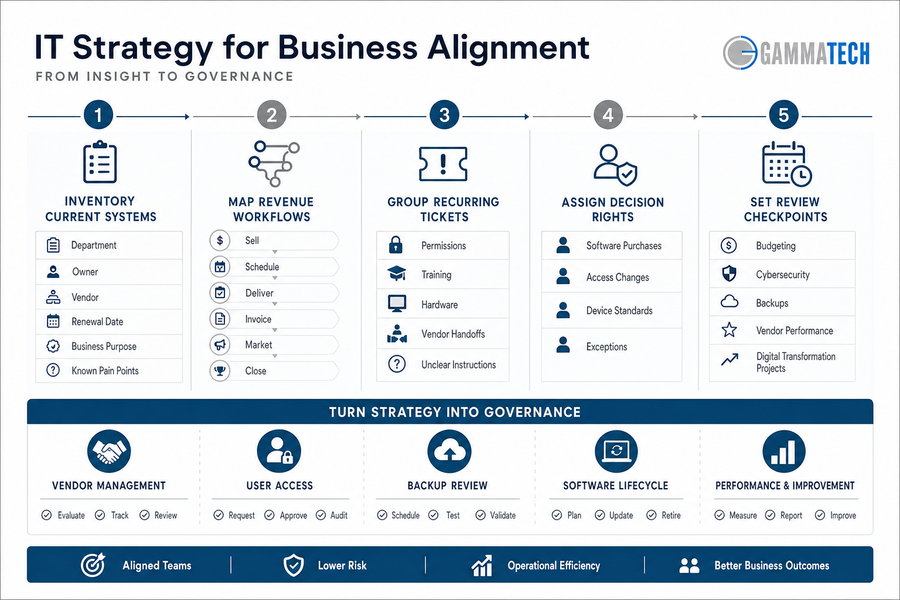
Creating An IT Strategy For Business Alignment
Organizational change is difficult because finance, operations, field teams, marketing, and vendors experience the same systems differently. A project manager cares about job files and deadlines. Finance cares about invoice accuracy. Marketing cares about campaign data and lead handoffs.
A business IT strategy must move from discussion to documented ownership, with enough flexibility to fit how work already happens. For example, 93% of executives say AI sovereignty must be factored into their 2026 business strategy, while 53% expect AI to transform business models in their industry by 2030.
Inventory current systems: List department, owner, vendor, renewal date, business purpose, and known pain points for each platform.
Map revenue workflows: Document how work is sold, scheduled, delivered, invoiced, marketed, and closed.
Group recurring tickets: Sort issues by root cause, such as permissions, training, hardware, vendor handoffs, or unclear instructions.
Assign decision rights: Define who approves software purchases, access changes, device standards, and exceptions.
Set review checkpoints: Review budgeting, cybersecurity, backups, vendor performance, and digital transformation projects on a set schedule.
The next step is turning those decisions into governance people can use, including vendor management, user access, backup review, and software lifecycle planning.
Documenting A Business IT Strategy People Can Follow
An undocumented plan fails when approvals depend on memory, vendor commitments live in email, or employees do not know where to submit requests. Details prevent delays.
Good documentation makes an IT strategy for business easier to execute because it gives managers, employees, vendors, and the IT partner the same reference point. It improves troubleshooting, timeline setting, cost estimates, and implementation steps because the service team can see the role, system, approval path, and business impact before work begins.
Governance calendar: Schedule periodic reviews for renewals, budgets, security reviews, backup tests, and major project status.
Request intake rules: Define how employees request software, new users, access changes, devices, marketing tools, or support.
Escalation and approval paths: Specify who approves cost, risk, customer impact, and exceptions when a request falls outside normal rules.
Service expectations: Clarify internal response priorities, vendor responsibilities, and what the IT partner should handle.
What this looks like in practice: A new hire should receive access to email, accounting software, CRM, job files, project tools, shared drives, and security groups before day one. Documentation organized by users and roles makes that request easier to approve, fulfill, and verify.
Clear documentation leads to better support outcomes and fewer preventable interruptions.
Turn Your IT Strategy Into Daily Action
Gamma Tech Services helps align systems, ownership, and workflows so your IT plan supports real operations, not just documentation.
A clear plan turns technology decisions into documented priorities, cleaner ownership, better support, stronger data habits, and lower operational confusion across approvals, tickets, invoices, and customer handoffs.
If you want help reviewing priorities, documenting the plan, and building an IT approach that supports how your business actually operates, contact Gamma Tech Services for IT Strategy services and support. We bring a warm, personable planning approach backed by careful troubleshooting and implementation detail, with support for small business, mid-sized business, enterprise, marketing IT, and digital transformation needs.
Our 20-year track record in the area and 99 percent customer retention rate over the past five years reflect the way we work: practical, attentive, and focused on the systems and workflows your team depends on every day. Contact us today.
Cloud systems keep expanding, users move between remote and on-site work, vendors multiply, helpdesk tickets pile up, cybersecurity approvals wait in inboxes, and budget decisions still need one coordinated plan. A practical IT strategy example should reduce reactive work for the people handling access requests, invoices, device issues, and vendor escalations every week.
At Gamma Tech Services, our planning stays close to those workflows because useful plans make decisions easier before tools are purchased. Strong IT strategy examples connect daily support realities to long-term maturity and give your team clearer control over what to approve, patch, monitor, escalate, and resolve.
Bradd Konert, President of Gamma Tech Services at Gamma Tech Services, notes: "Start by mapping who requests access, who approves spend, and who resolves tickets, because unclear ownership turns simple technology decisions into recurring operational delays."
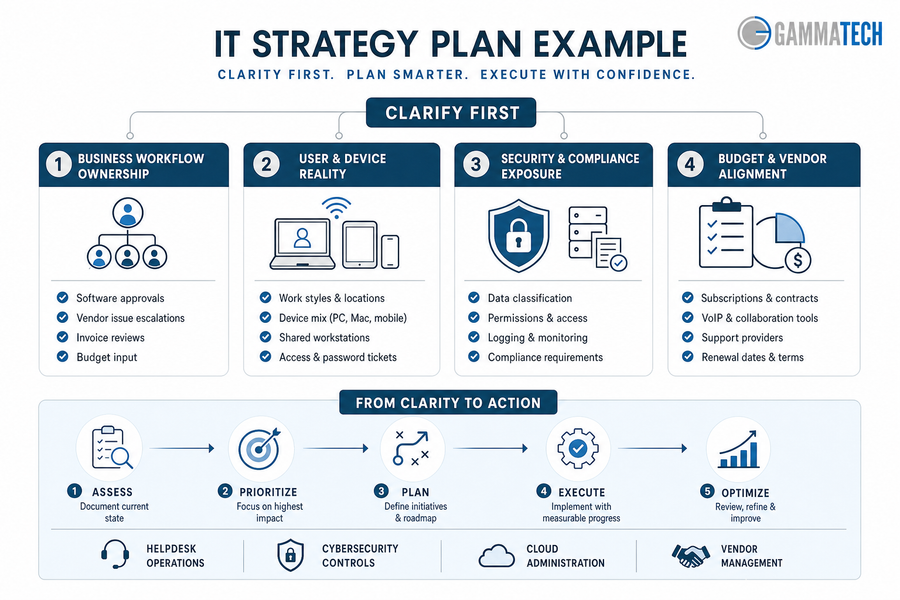
What An IT Strategy Plan Example Should Clarify First
Clarity comes before tool selection, vendor changes, or budget approval. When ownership is vague, a routine software renewal becomes a finance question, a security exception waits for approval, and a helpdesk ticket stays open while staff work around the problem.
That discipline matters when technology spending faces outside pressure, including IDC research showing that over 30% of IT leaders named geopolitical impact on tech budgets as the primary risk.
Business workflow ownership: Document who approves software, escalates vendor issues, reviews invoices, and gives budget input when a router, firewall, or cloud renewal is due.
User and device reality: Review how people actually work, including shared workstations, field tablets, personal mobile devices, Mac users, and recurring access tickets.
Security and compliance exposure: Identify where patient data, customer records, project files, and financial reports need stronger permissions, logging, and approval steps.
Budget and vendor alignment: Review subscriptions, contracts, VoIP tools, support providers, cloud platforms, network equipment, and renewal dates before costs drift.
Once these basics are documented, planning moves from opinion to prioritized action. The next layer is helpdesk operations, cybersecurity controls, cloud administration, and vendor management.
An IT Strategy Roadmap Example For Operational Maturity
A roadmap turns priorities into sequenced decisions, not a long wish list. The right order depends on users, software, vendors, risk profile, and internal capacity, so you should adjust an it strategy roadmap example as conditions change.
A construction firm may need field tablets connected to project files, VoIP, cloud storage, and jobsite connectivity before a superintendent can approve change orders on schedule. If permissions, mobile device settings, and vendor applications are not documented, helpdesk tickets rise and project managers wait for file access. A clinic faces a similar issue when scheduling and billing systems need secure access for front desk staff, providers, and billing teams.
Sequencing matters because every phase affects the next. Stabilize support first, then document vendors and systems, strengthen cybersecurity controls, modernize cloud and workflow tools, and review budget and ownership with the people who approve spend and depend on uptime. We plan this way because a roadmap has to reflect real software, real vendors, and the capacity available to assess, configure, monitor, and adjust.
A Technology Strategy Example Tied To Business Impact
Technology strategy should reduce measurable friction in daily operations, not simply add platforms. A strategic IT plan connects support, security, vendors, cloud systems, and implementation work to the moments where staff lose time, customer response slows, or risk increases.
Fewer recurring support tickets: Document device standards, patch schedules, and helpdesk routing so a printer issue, laptop failure, or software access request reaches the right technician faster.
Cleaner access control decisions: Role-based access, onboarding, offboarding, and manager approvals reduce exposure when employees change roles or leave with cloud accounts still active. The practical question is simple: who approves access, who removes it, and where is that decision recorded?
Better vendor accountability: Vendor management ties renewals, invoices, licensing, contract terms, and support escalation to one review process instead of leaving deadlines buried in scattered emails.
Stronger cybersecurity readiness: Managed firewall, endpoint protection, anti-phishing, mobile device security, ransomware protection, penetration testing, and network monitoring work best when configured around real users and data.
More reliable cloud operations: Cloud security, backups, VoIP, network performance, and remote access directly affect uptime, call quality, and staff productivity. IBM reports that 63% of more advanced organizations report effective strategy execution, compared to 46% of less advanced organizations.
Operational Signal to Track
System or Data Source
Owner
Practical Decision It Supports
Repeat tickets from the same department, device model, or application within 30 days
PSA/helpdesk platform, endpoint management logs, knowledge base search reports
Service Desk Manager
Update laptop standards, rewrite a setup article, or change ticket routing for payroll, CRM, or printer issues
Inactive users with active Microsoft 365, VPN, or finance system access
How An IT Strategy Template Becomes Daily Execution
Change is difficult because each department depends on different tools, vendors, approval paths, and support expectations.
IT strategy examples become useful only when the working document assigns ownership, timing, budget, risk level, and the next review date, especially as Forrester reports 86% of tech leaders expect increased budgets from the year before despite uncertainty.
Inventory systems, users, devices, cloud platforms, network equipment, VoIP, and critical vendor applications, including who uses them and who approves changes.
Map recurring tickets to root causes such as permissions, outdated devices, poor documentation, weak Wi-Fi, or vendor response delays.
Assign owners for patch management, access approvals, renewals, security reviews, backups, and escalation paths when systems fail or deadlines approach.
Review the roadmap quarterly with business leaders, finance, department heads, and IT support partners, supported by vCIO or Technical Account Manager guidance when planning accountability needs a consistent owner.
The template is not paperwork; it creates decision discipline.
Build Your IT Operating Plan
Turn your IT strategy example into practical priorities for support, security, vendors, and budgets with Gamma Tech Services.
Using Examples Of IT Strategy To Decide What Changes Next
Examples help you compare options, but the final plan must reflect actual users, devices, workflows, vendors, and risk. A useful IT strategy example also accounts for new spending pressures, such as IBM reporting AI investment has grown to about 12% of IT spend in 2024.
Stabilize what breaks: Prioritize outages, recurring tickets, slow networks, unresolved escalations, and poor vendor response that interrupt billing, scheduling, jobsite coordination, or customer handoffs.
Secure what matters: Focus on customer data, employee accounts, mobile devices, firewall rules, endpoint protection, and cloud access before adding more applications.
Plan what grows: Connect digital transformation, marketing IT services, enterprise IT services, and healthcare or construction software support to future staffing, sites, and capacity.
Plain language helps planning stay usable for the people approving changes, the staff opening tickets, and the vendors responsible for resolving them. Long-term IT strategy, technology implementation, cybersecurity planning, and cloud support all need clear owners, timelines, and approval paths.
Build Your Strategic IT Plan With Gamma Tech Services
A practical technology strategy example turns planning into clearer ownership, stronger security, better vendor control, and fewer operational surprises across tickets, approvals, invoices, cloud access, and support escalation.
With our 20-year track record, personable service, flexible planning, and careful follow-through, we connect IT strategy, cybersecurity, cloud, helpdesk, vendor management, and long-term roadmapping to the way work actually gets done.
If you are ready to move from scattered technology decisions to a coordinated plan, contact Gamma Tech Services to review current IT priorities and build a plan that fits the way the business actually works.
For executives managing approvals, tickets, customer commitments, vendors, compliance, and workforce productivity, the helpdesk is no longer a back-office queue. It is an operational control point.
The data supports that shift: 86% of service teams say a help desk system increases productivity, which is why IT helpdesk best practices now affect daily throughput, not just technical response. Small delays compound across invoices, access requests, field updates, and customer follow-through.
Bradd Konert, President of Gamma Tech Services, notes: "A strong helpdesk gives leaders a clearer view of where work is slowing down, who owns the next step, and which issues need a process fix instead of another one-off repair."
Use A Helpdesk Process Your Team Can Actually Rely On
Improve ticket visibility, strengthen accountability, and keep approvals, users, vendors, and business workflows moving without avoidable delays.
IT Helpdesk Best Practices That Protect Daily Operations
Executives should treat the helpdesk as an operating control because poorly managed tickets slow approvals, interrupt revenue-facing work, and leave managers without reliable status. When well-documented systems reduce troubleshooting by 40-60%, the business value is clear: better documentation protects time, consistency, and accountability.
Ticket ownership clarity: Every ticket needs a named owner. If an accounts payable user cannot access invoice approvals, unclear ownership creates duplicate tickets, repeated follow-ups, and manual manager intervention.
Response priority rules: Priority rules protect revenue-impacting work, field teams, clinical workflows, and customer-facing systems by making business urgency visible.
User communication standards: Consistent updates reduce duplicate tickets and reassure employees that the issue is moving through a defined process.
Recurring issue review: Repeat tickets should feed process improvement, vendor escalation, training, or system changes when the same issue keeps draining time.
How An IT Helpdesk Best Practice Improves Service Accountability
Before a leadership meeting, a business leader reviews unresolved tickets and sees the pattern: users are waiting, managers lack status, and vendors have not responded clearly. A disciplined ownership and escalation process turns that uncertainty into accountability, especially when help desks resolve approximately 70% of issues at first contact and route the rest to specialist teams.
A strong IT helpdesk best practice defines who owns the ticket, when it escalates, what information must be captured, and how status moves between users, managers, vendors, and IT. That matters when a construction project manager cannot access updated plans before a subcontractor meeting, or when a healthcare office is waiting on software access before the next appointment block.
In both cases, "in progress" is not enough. Leaders need ownership, escalation timing, and a clear next action tied to work already in motion. We see stronger outcomes when support combines careful troubleshooting with personable service: users provide better context, technicians ask better questions, and managers get cleaner status without chasing every handoff.
IT Helpdesk Category Best Practices Improve Prioritization When They Reflect Real Workflows
Categories are not administrative labels. They determine routing, reporting, resource planning, and leadership visibility. When 70% of customers expect any agent or employee they engage with to have full context of their situation, poor categorization becomes a service failure, not a filing issue.
Strong IT helpdesk category best practices should reflect real workflows. For a construction firm, "application issue" is too broad if the delay involves plan files, field tablets, or project management software. For a healthcare office, access management, patient scheduling software, and vendor-supported clinical applications need separate visibility.
We build categories around how tickets, approvals, devices, vendors, and users actually move through the business. The leadership question is practical: what would your helpdesk need to show if the business added locations, expanded services, or changed approval requirements?
Operational Scenario
Category Design Decision
Primary Owner
Evidence to Capture
Leadership Signal Created
New regional office opens with 80 employees using Microsoft 365, VPN, printers, and badge access
Create location-specific subcategories under network, endpoint, facilities handoff, and identity requests
IT Service Desk Manager with Regional Operations Lead
Site code, affected floor, device asset tag, ISP circuit ID, employee department
Shows whether growth is creating repeat incidents at a specific site or vendor dependency
Sales team reports repeated Salesforce login and permissions issues after territory changes
Separate identity provisioning from application role configuration to prevent false escalation
How Helpdesk Best Practices Improve Ticket Resolution And Business Performance
Better helpdesk execution changes measurable outcomes, including service levels, vendor performance, labor productivity, and audit readiness. Teams that follow disciplined help desk practices see meaningful gains, with organizations implementing best practices reporting a 35% improvement in customer satisfaction.
Faster user productivity recovery: Timely resolution reduces downtime for employees who depend on systems to complete payroll, billing, project work, clinical coordination, or customer response.
Cleaner escalation decisions: Clear rules prevent tickets from sitting with the wrong technician, approver, or vendor until a deadline or customer commitment has already been missed.
Stronger vendor performance visibility: Categorized tickets and documented handoffs reveal recurring issues with an application, device, carrier, or software provider, giving leadership evidence for vendor reviews and contract discussions.
Better audit trail quality: Documented ticket activity shows who requested access, who approved it, what changed, and when the work was completed. This protects audit readiness for access changes, terminations, shared files, and regulated workflows.
More reliable budget planning: Recurring ticket patterns help leaders separate training gaps, process defects, vendor weaknesses, and aging technology investments.
Building Helpdesk Best Practices Into Daily Team Workflows
Changing helpdesk behavior is difficult because users, managers, vendors, and technicians already have habits for reporting problems and chasing updates. The work becomes easier when teams treat workflow design as a business process, especially since 80% of support agents say better access to other departments' data would improve their ability to serve customers.
Define priority levels in business terms, such as payroll blocked, project deadline at risk, customer response delayed, or clinical workflow interrupted.
Create ticket intake standards that require system name, user impact, urgency, screenshots where relevant, and approval of the owner.
Review recurring issues monthly with operations, finance, HR, or department leaders when patterns affect productivity or risk.
Assign category owners for access, devices, applications, vendor issues, security concerns, onboarding, and offboarding, then adjust those categories as workflows change.
We often adapt these workflows around how a client actually works, because a rigid process fails when it ignores approval chains, software dependencies, and department responsibilities. That flexibility matters in healthcare and construction environments where software access issues, jobsite device failures, or vendor delays affect schedules, service commitments, and compliance expectations.
Talk With Gamma Tech Services About Stronger Helpdesk Operations
Disciplined helpdesk practices improve ticket flow, accountability, reporting, user productivity, and leadership visibility. Strong teams often maintain high customer satisfaction scores when service quality is measured consistently.
At Gamma Tech Services, we bring a warm, practical approach supported by careful troubleshooting and a 20-year local track record. Our client relationships are built on steady service, clear expectations, and flexible processes that fit real workflows, including healthcare and construction software environments. We also use a per-user service model rather than a per-endpoint approach, aligning support with the people who need work to keep moving.
Our 97% customer retention rate over the past five years and more than 200 Google reviews with an average rating of 5 stars reflect that service standard. Contact us for a practical conversation about strengthening helpdesk operations around your people, approvals, vendors, and business priorities. Contact us today.
Growing businesses cannot afford vague support ownership when approvals, access, devices, vendors, and line-of-business systems are tied to daily revenue.
The distinction between IT support and help desk ownership matters now because support expectations are rising as the global help desk support segment is projected to grow from USD 5,547.0 million in 2025 to USD 11,325.0 million by 2033.
Bradd Konert, President of Gamma Tech Services, notes: "The issue is not terminology alone. Leaders need a support model that protects uptime, user productivity, security, and operational maturity without leaving accountability unclear."
Build A Support Model Your Team Can Actually Rely On
Reduce recurring disruptions, clarify ownership, and connect helpdesk, IT support, and service desk decisions to your business workflows.
IT Support Vs. Helpdesk In Everyday Business Operations
Leaders should define the support model before judging response times, ticket volume, or vendor performance. The wrong structure turns routine issues into workflow delays: invoices sit unfinished, field updates arrive late, approvals stall, and managers lose time chasing ticket status.
User expectations also show why channel and ownership matter: 82% of customers want a more human interaction in their support experience, which applies when employees are blocked by access, software, or device issues.
Helpdesk handles immediate friction: A helpdesk resolves password resets, basic software problems, printer issues, and device questions so employees can get back to work quickly.
IT support owns continuity: Broader IT support includes planning, prevention, systems administration, cybersecurity coordination, backups, vendor management, and business continuity.
Users are the business lens: Our per-user service view focuses on whether each person can perform their job across devices, applications, and workflows, not just how many endpoints appear on a list.
Patterns deserve escalation: Repeated login problems, recurring application errors, and slow vendor responses signal that a ticket queue needs deeper ownership, not only faster closure.
Helpdesk Vs. IT Support Matters When Tickets Start Shaping Your Day
A field manager waiting on device access, an accounting team blocked from invoicing, or a clinical office waiting on software permissions does not experience IT as a department label. They experience delayed approvals, missed job updates, slower patient workflows, and weaker customer responses. That is why phone support remains relevant for complex issues, with 69% of consumers still preferring it for certain problems because they need a human touch.
Response ownership must be clear. Every ticket needs an owner when the issue affects billing, scheduling, clinical access, or customer response time.
Escalation paths need discipline. Frontline support should know when to move an issue to deeper technical support instead of repeatedly trying the same fix.
Recurring issues require analysis. A password reset is routine once; repeated access failures point to permissions, identity controls, training gaps, or application configuration.
Vendors need active coordination. Software providers, internet carriers, copier vendors, and cloud platforms should not leave managers chasing disconnected updates.
Leadership needs decision visibility. Executives need to see which systems, teams, and vendors are creating delays so they can approve fixes based on operational impact.
Helpdesk Vs. Service Desk As Your Company Matures
A basic helpdesk function answers user issues; a more mature service desk approach manages requests, approvals, documentation, and accountability across the business.
The practical difference in helpdesk vs. service desk shows up when support becomes tied to onboarding, compliance, software permissions, and workflow protection, especially in industries where voice support remains the top choice in healthcare at 63%, financial services, and other trust-heavy environments.
What this looks like in practiceWhen a construction firm hires a new estimator, support is not just a laptop request; it includes estimating software access, job file permissions, email groups, printer mapping, and vendor licensing. In a healthcare office, provisioning clinical software access also needs role-based permissions, timing discipline, and documentation so patient workflows are not disrupted.
Because we support and administer software for healthcare and construction businesses, we see how mature service desk practices depend on industry context. The request record needs enough detail for the next person to act: user, location, system, urgency, approval status, deadline, and business impact. Without that structure, the same access or software issue restarts from zero each time, and managers keep losing time to status checks that should already be visible.
Operational Scenario
Service Desk Control Added
Required Handoff or Approval
Business Risk Reduced
New healthcare billing coordinator needs EHR, clearinghouse, and shared drive access before Monday clinic hours
Role-based access template with audit notes for each system provisioned
Practice manager approves EHR role; IT confirms MFA enrollment and access expiration rules
Incorrect patient data exposure, delayed claims submission, and undocumented permissions
Construction project manager moves from one jobsite to another with different file shares and plan software needs
Jobsite transfer workflow covering permissions, printer mapping, VPN profile, and license assignment
Clear IT Support And Helpdesk Roles Strengthen Your Operating Model
How can clearer support roles help your business scale without adding avoidable delays?
Ticket triage, user access, system administration, vendor coordination, and security oversight all need defined ownership. That clarity matters because the labor market is expanding unevenly: BLS data cited by Spiceworks projects information security analyst roles to grow 33% between 2023 and 2033, while user support specialist roles grow at a much slower rate and network administrator roles contract.
Leaders should assign accountability based on business impact, not technical labels. Frontline support can handle routine user needs, deeper technical support can resolve system-level problems, security oversight can protect access, and business system owners can approve workflow changes. The model should show who receives the ticket, who approves the change, who communicates with the user, and who decides when a recurring issue becomes a business risk.
Approvals need clean routing: Software requests, permission changes, and purchasing decisions should move through known approvers before support implements changes.
Onboarding needs one plan: New users need devices, accounts, applications, permissions, MFA, printers, and training aligned before their start date.
Offboarding needs control: Departing users should lose access promptly across email, cloud apps, shared files, industry software, and vendor portals.
Recurring incidents need ownership: Repeat tickets should trigger root-cause review, cyber hygiene checks, vendor escalation, or workflow adjustment.
Helpdesk Or IT Support Decisions That Affect Risk And Cost
Changing your support structure affects habits, budgets, responsibilities, and expectations across departments, so leaders should define the operating model before changing vendors or internal processes. This matters in local labor markets as well; in 2024, South Carolina employed 10,510 computer user support specialists, which reinforces that support capacity is an operational planning issue, not just a technical preference.
Map ticket types by workflow: Separate password resets, application issues, device failures, vendor problems, security alerts, onboarding tasks, and approval requests.
Identify repeat disruptions: Look for tickets that return weekly or monthly, especially those tied to invoicing, scheduling, scanning, job management, or clinical workflows.
Clarify escalation rules: Define when frontline support escalates, who owns the next step, and how managers receive status updates.
Review access controls: Confirm onboarding and offboarding steps for email, cloud apps, shared files, MFA, industry software, and vendor portals.
Evaluate pricing against users: A per-user service model helps executives evaluate support around real people and workflows rather than counting devices alone. If one employee uses a laptop, mobile device, shared applications, and vendor portals to complete a role, the question is whether that person can work without avoidable interruption.
Choosing Support That Fits How Your Team Works
The right distinction helps you improve response quality, reduce recurring disruption, clarify accountability, and support growth with fewer operational surprises. Review your current model against the work employees perform every day: who approves access, who fixes a failed invoice export, who coordinates with the software vendor, and who tells managers when a recurring issue needs a permanent fix.
At Gamma Tech Services, we bring a warm, practical service style backed by a 20-year local track record, a 97% customer retention rate over the past five years, and more than 200 Google reviews averaging 5 stars. As a family-owned team, our technicians and account managers focus on helping clients feel understood, not processed.
We also avoid charging new clients for both onboarding and the first month of service within the same month, so the transition can be planned with care. If you want clearer ownership across help desk, IT support, and service desk workflows, we can help you assess the model in operational terms. Contact us today.