Naples, FL · Serving Southwest Florida(239) 330-4939

Gamma Tech · Southwest Florida

Layered Lighting: How to Plan Lighting for a New Luxury Home

Walk into a beautifully designed home and the lighting is one of the first things you notice, even if you can’t say why. Rooms feel warm, calm and balanced. Art glows, ceilings feel taller and every surface looks its best. That effect comes from layered lighting, planned during construction. Here is how it works and how to plan it for your new home.

Talk with our team

The four layers of light

Ambient light is the general light that fills a room. In a luxury home it often comes from recessed downlights or cove lighting that washes the ceiling with a soft glow.

Task light helps you see what you are doing: under-cabinet lights over a kitchen counter, sconces beside a vanity, a reading light by a favorite chair.

Accent light draws the eye to the things you love, such as artwork, a stone wall, a bookcase or architectural details.

Decorative light is the jewelry of the room: chandeliers, pendants and sconces chosen as much for how they look as for the light they give.

Why layers make a room feel premium

A room lit from a single source looks flat. Layers create depth, highlight texture and let one room play many roles. Bright layers work for cooking and cleaning, while softer accent and cove lighting turns the same space into a relaxed setting for dinner with friends.

Our Naples experience center is a good example. Cove lighting, recessed downlights and lit shelving work together, and that balance is much of what makes the room feel calm and high end.

Plan lighting during construction

The best time to design lighting is during construction planning, alongside your architect, builder and interior designer. At that stage we can place fixtures exactly where they belong, plan coves and niches, and run the wiring each layer needs before the drywall goes up.

Planning early also lets us place keypads thoughtfully. A well-designed home needs far fewer controls on its walls, and each one is engraved with simple scenes such as Welcome, Dinner and Goodnight.

Bring the layers together with lighting control

Layers are only as good as your ability to use them. Lighting control lets one press set every layer in a room at once, and your smart home app adjusts any light from anywhere. Lights can rise gently in the morning, dim in the evening and follow your routine automatically.

Curious how the controls are wired? Our guide to panelized, wireless and digital lighting control explains the options in plain language.

A simple planning checklist

  • Decide how each room should feel in the morning, the evening and late at night.
  • Identify the art, stone and architecture you want to highlight.
  • Choose decorative fixtures early so the other layers can complement them.
  • Plan keypad locations around how you move through the home.
  • Include exterior and landscape lighting for arrival, the pool and the garden.

Our team designs layered lighting and Lutron lighting control for homes in Naples, Marco Island and across Southwest Florida. Explore our lighting control and design services or call (239) 330-4939 to start planning.

Gamma Tech · Southwest Florida

Panelized, Wireless or Digital? Lighting Control Explained

Planning a new home or a major remodel in Naples usually means hearing three unfamiliar phrases from your architect, builder or lighting designer: panelized lighting, wireless lighting control and digital addressable lighting. All three let you set scenes, dim lights and control your home from an app. The difference is how the lights are wired and controlled behind the walls. Here is what each one means in plain language.

Talk with our team

Panelized lighting: one central brain

With a panelized system, the lighting circuits in your home run back to a central lighting panel, usually in a utility room or equipment closet. The dimming happens in that panel. The keypads on your walls simply send commands, so a single slim keypad can control a whole room of lights.

The result is the cleanest look on your walls. A hallway that might need six switches can have one engraved keypad instead. Panelized lighting is the most common choice for new construction and larger luxury homes, because the wiring is planned from the start and the system is easy to service from one location.

Best for: new construction, large homes and homeowners who want the fewest controls on their walls.

Wireless lighting control: smart dimmers that talk to each other

A wireless system uses smart dimmers and keypads that fit in the same wall boxes as ordinary switches. Each dimmer controls the lights wired to it and communicates with the rest of the system over a dedicated, reliable wireless signal.

Wireless control uses your existing wiring, which makes it the natural way to add scenes, schedules and app control to a finished home. We can upgrade room by room with little disruption to walls, ceilings or finishes.

Best for: existing homes, remodels and projects where opening walls is not practical.

Digital addressable lighting: every fixture on its own

Digital addressable lighting gives each light fixture its own digital address. Fixtures share a control wire, and the system can talk to each one individually. A single circuit can hold many fixtures, and each can be dimmed, grouped and regrouped in software.

With compatible fixtures, digital control can also adjust the color of the light, from crisp daylight in the morning to warm candlelight in the evening. Lighting designers often use it in signature spaces such as great rooms, art walls and kitchens where precise control matters most.

Best for: signature rooms, art lighting and tunable white or color lighting.

Many homes use more than one

These approaches work together. A new home might use a central panel for most rooms, digital fixtures in the great room and wireless controls in a guest house. Every option works with the same keypads and the same app, so the system feels like one home to the people living in it.

How to choose

The right answer depends on whether you are building or upgrading, how many controls you want on your walls and how much control you want over each fixture. The best time to decide is during construction planning, before the walls are closed and the wiring is set.

Our team designs Lutron lighting control and integrates it with your Control4 or Crestron Home smart home. Visit our lighting control and design page to see how we work, or call (239) 330-4939 to plan your lighting with our Naples team.

Gamma Tech · Southwest Florida

Gamma Tech Celebrates 2026 MSP 501 Recognition

Gamma Tech celebrates its place on the 2026 MSP 501 at the September 30 awards gala in Orlando.

Celebrating Gamma Tech’s MSP 501 recognition with an award at the gala
Celebrating Gamma Tech’s 2026 MSP 501 recognition at the September 30 awards gala in Orlando.

Gamma Tech has been named to the 2026 MSP 501, placing No. 456 on the annual global ranking of managed service providers. The Naples-based company celebrated the recognition at the MSP 501 Awards Gala on September 30 at Loews Royal Pacific Resort in Orlando.

The recognition belongs to the people who support our clients every day. Our technicians, engineers, project teams, and support staff work together to help businesses keep their technology dependable, protect their information, and plan for what comes next. We are grateful to our team and to the clients who continue to trust Gamma Tech with their businesses.

Talk with our team

What the MSP 501 recognizes

The MSP 501 evaluates managed service providers on financial performance, operational efficiency, and business health. The program considers sustainable growth, recurring revenue, and profitability as part of its assessment. Gamma Tech’s inclusion places the company among the 501 providers selected for the 2026 list.

A managed service provider supports a business’s technology on an ongoing basis. For Gamma Tech, the work includes IT support, cybersecurity, and helping clients make practical decisions about the systems their teams rely on.

Built in Naples, serving Southwest Florida

Bradd Konert started Gamma Tech in 2004 at age 16. The company has grown into a team serving homes and businesses across Southwest Florida, with services that include managed IT, cybersecurity, audio and video, and connected-home technology.

Gamma Tech’s purpose is to restore joy and trust in technology. Earning a place on the MSP 501 is a meaningful milestone as our team continues the daily work of caring for clients, solving problems, and building lasting relationships.

Thank you to our Gamma Family, our clients, and the partners who support our work.

Read the organizer’s 2026 MSP 501 list and learn more about Gamma Tech’s IT and cybersecurity services.

Gamma Tech · Southwest Florida

What Is A vCIO? A Practical Guide To Executive IT Decisions

Listen on Amazon MusicListen on Apple Podcasts

Approvals pile up when no one owns the IT decision structure. Helpdesk tickets, cloud systems, vendors, routers, firewalls, endpoints, and software renewals keep moving, but the business lacks one clear view of cost, risk, and priority.

That is why the question “what is a vCIO?” matters. IT spending, security exposure, and user productivity affect daily operations, not just back-office systems. At Gamma Tech Services, we focus on guidance that fits real users, real vendors, and real deadlines.

Bradd Konert, President of Gamma Tech Services at Gamma Tech Services, notes: "A useful IT roadmap starts with the tickets, invoices, access requests, and renewals already on your desk, then turns them into clear decisions."

Talk with our team

What Is A vCIO In Practical Business Terms

A vCIO is a part-time or outsourced senior IT advisor who helps leadership make better technology decisions without hiring a full-time executive. The role connects spending, security, cloud planning, and user productivity to business priorities. That matters when access decisions create measurable risk; 53% of respondents identify lenient identity and access management as a top challenge.

  • Support versus strategy: Helpdesk fixes the locked laptop. Advisory work asks why lockouts keep hitting payroll and whether onboarding, access policies, or aging devices are driving repeat tickets.

  • Budgets follow users: Our per-user model supports planning around how employees work across devices, applications, and locations.

  • Renewals need ownership: Software invoices, vendor terms, and cloud seats get reviewed before approval deadlines arrive.

  • Security gets prioritized: Firewall, access, and endpoint decisions are ranked by operational risk, compliance needs, and user impact.

What Does A Virtual CIO Do Across Daily Operations

Leadership often approves IT invoices, software subscriptions, firewall changes, and hardware purchases without one roadmap. A virtual CIO connects those decisions to daily operations, using what our helpdesk, network, cloud, and cybersecurity teams see in tickets, alerts, renewals, and stalled projects.

  1. Builds practical IT budgets: Replacement laptops, VoIP renewals, cloud licenses, and support needs move into a forecast, reducing surprise approvals.

  2. Manages vendor follow-through: Carrier tickets, software escalations, renewal dates, and support delays get tracked against service impact.

  3. Plans security priorities carefully: Over one in three Google Cloud VMs, or 33%, have sensitive permissions to a project, so access reviews need business ownership.

  4. Guides cloud decisions: IAM misconfigurations were the initial access vector in about 4% of cases, which makes setup details worth reviewing before migration, expansion, or vendor handoff.

  5. Turns tickets into projects: Recurring Wi-Fi, patching, application, or login complaints become scoped work with timing, cost, user impact, and ownership defined.

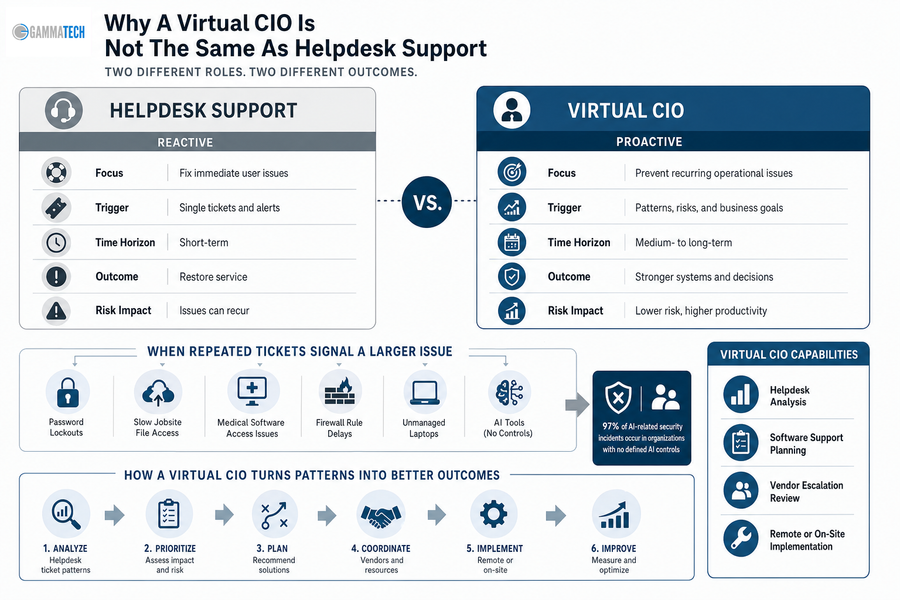
Why A Virtual CIO Is Not The Same As Helpdesk Support

Helpdesk support fixes immediate user problems, while executive IT guidance helps prevent recurring operational issues from becoming budget, security, or productivity problems. Our technicians and account managers stay approachable and detail-oriented, but repeated ticket patterns need a planning layer.

If users keep reporting password lockouts, slow jobsite file access, medical software access issues, firewall rule delays, or unmanaged laptops, the issue is larger than one ticket. The same applies to AI tools, where 97% of AI-related security incidents occur in organizations with no defined AI controls. Friendly support matters, and so does turning the pattern into an accountable decision.

That is where what is a virtual CIO becomes a practical operating question.

Capabilities include helpdesk analysis, software support planning, vendor escalation review, and remote or on-site implementation.

what is a vcio

Build Your IT Leadership Playbook

What Is A Virtual CIO When Security And Cloud Risk Grow

Security, cloud, and network choices become executive issues when they affect insurance requirements, compliance, remote access, billing systems, customer trust, or productivity. We treat those choices as risk management, including whether cloud firewall planning belongs on this year's roadmap, as 24% of respondents plan to move primarily to cloud firewalls over the next two years.

  • Firewall oversight: Managed firewall and router reviews reduce unclear rule changes, document approvals, and prevent one-off requests from becoming permanent exposure.

  • Patch and endpoint control: Patch management, antivirus, and endpoint protection reduce preventable tickets from unmanaged laptops, missed updates, and unsupported devices.

  • Cloud access discipline: 76% of organizations don't enforce MFA for console users, and 58% don't enforce MFA for root or admin users, making access ownership a business issue.

  • Response planning: Anti-phishing, mobile device security, ransomware planning, and testing clarify who acts when alerts appear and which systems take priority.

Turn IT Decisions Into A Clear Roadmap

If vCIO planning is the next step, Gamma Tech Services can help align your IT priorities, risk, vendors, and budget decisions.

Book a Consultation

Building A vCIO Roadmap That Leadership Can Actually Use

Change is difficult because users still need support, vendors still send invoices, and leadership still has to approve spending while projects are underway. We build roadmaps around your software, approvals, vendors, users, and budget timing, rather than forcing your team into a rigid template.

  • Inventory systems and vendors: List applications, contracts, routers, firewalls, cloud platforms, support contacts, and renewal dates.

  • Review recurring tickets: Slow VPN access deserves attention when nearly half, or 46%, of VPN clients are misconfigured or out of date.

  • Map security gaps: Since 75% of organizations have consolidated some security tools or policies, decide where central management improves oversight.

  • Set quarterly reviews: Revisit cost, timing, implementation status, vendor performance, and open helpdesk trends before small delays become stalled work.

Talk With Gamma Tech Services About Your Next IT Decision

A clear IT decision structure gives you better planning, cleaner vendor accountability, stronger security priorities, and less strain on internal teams handling tickets, approvals, and renewals.

At Gamma Tech Services, we bring a 20-year local track record and a warm, practical service style to managed IT, cybersecurity, cloud, helpdesk, vendor management, and vCIO Services. If your next technology decision starts with tickets, invoices, access requests, and renewals, contact us for a grounded conversation about what should happen next and what can wait.

Explore IT Consulting Solutions Near You

Gamma Tech · Southwest Florida

The Benefits Of IT Consulting For Cleaner Workflows And Stronger IT Decisions

Listen on Amazon MusicListen on Apple Podcasts

Ticket volume rises when systems do not share data, cloud choices sit unresolved, and security reviews add steps to every approval. Leaders evaluate the benefits of IT consulting because internal teams are often handling vendor coordination, user support, software administration, and access requests at the same time.

Bradd Konert, President of Gamma Tech Services at Gamma Tech Services, notes: "Good consulting starts by finding where approvals, tickets, vendors, and security controls slow the business, then turning those findings into clear next actions."

Cybersecurity is a clear driver, with 60% of respondents naming it the top challenge that led them to work with an MSP. IT services spending reached $1.59 trillion in 2024, reflecting a practical need: experienced guidance that turns security reviews, cloud decisions, vendor follow-up, and support workflows into manageable work.

Talk with our team

Benefits Of IT Consulting Services For Daily Operations

Consulting value is clearest when routine workflows become easier to manage.

  • Cleaner ticket triage: Repeated password resets, printer issues, and application errors get sorted by root cause.

  • Predictable user support: Access requests, device questions, and application needs follow a consistent path for each employee.

  • Stronger vendor follow-up: Renewals, failed integrations, and billing questions do not sit between managers, vendors, and unresolved tickets.

  • Better software administration: The benefits of consulting in IT include clearer planning when teams use multiple devices or applications, which fits our per-user model better than endpoint-based service assumptions.

What Are The Benefits Of Hiring IT Consulting Services?

You need examples tied to real workflows, not abstract IT theory.

In a healthcare setting, the benefits of hiring an IT consulting service appear when a new clinician needs access to scheduling, records, and secure file sharing before the first shift.

Outsourcing data shows 65% of organizations use outside partners to keep teams focused on core business, 53% address capability gaps, 24% buy speed and efficiency, and 18% seek senior expertise.

Cost reduction still leads at 63%, but our work with healthcare and construction software reinforces another point: clean handoffs reduce disruption when access, files, invoices, or project records cannot wait.

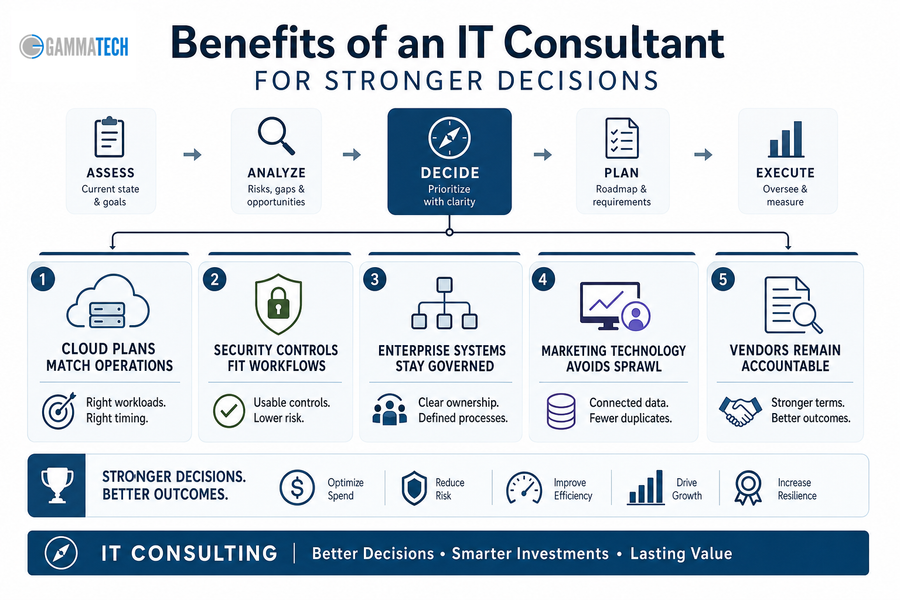
Benefits Of An IT Consultant For Stronger Decisions

Consulting improves decision quality before spending becomes contracts, migrations, or long-term support obligations. The benefits of hiring an IT consultant come from clarifying workflows, then moving implementation forward with the right owners, controls, and vendor expectations.

  1. Cloud plans match operations: Service providers spent $65.6 billion on compute and storage infrastructure in 4Q24, up 103.9%. Our Cloud Consulting helps you decide what belongs in the cloud before invoices multiply and support responsibilities blur.

  2. Security controls fit workflows: With 60% naming cybersecurity as the top MSP driver, our Cyber Security Consulting turns policy into usable controls for sign-ins, devices, permissions, and support tickets. Another analysis notes that 40% of organizations are turning to fully managed security services for operational technology.

  3. Enterprise systems stay governed: Our Enterprise IT Services clarify data owners, approval paths, and support expectations.

  4. Marketing technology avoids sprawl: Our Marketing IT Services connect forms, CRM fields, and campaign data to reduce duplicate records and reporting delays.

  5. Vendors remain accountable: IT services spending has reached $1.59 trillion, so vendor promises need review before they become long contracts or support gaps.

benefits of it consulting services

Keep Improving Your IT Operations

Benefits Of Hiring IT Consultants During Change

Change is difficult because approvals, user habits, budgets, and security reviews move at different speeds. A migration can be technically sound and still frustrate staff if invoice workflows change before access, training, or support ownership is ready. We set realistic expectations around timing, cost, and implementation so change does not depend on optimism.

We help turn that change into sequenced work people can follow.

The benefits of IT consultants show up across digital transformation, cloud migration, software administration, cybersecurity improvements. IT services spending reached $1.59 trillion, while 65% outsource to keep teams focused and 53% close capability gaps.

Clarify Your Next IT Move

Turn workflow friction, vendor gaps, and security questions into a practical IT plan with Gamma Tech Services.

Book a Consultation

Benefits Of Hiring An IT Consultant Before Problems Scale

IT improvements fail when teams skip discovery, ownership, communication, and follow-through. The benefits of IT consulting services come from disciplined troubleshooting paired with clear conversations, so people know where to send requests, who approves changes, and what happens next.

  • Review ticket patterns: Group recurring issues by root cause, such as login failures, application errors, or repeated escalations.

  • Map approval workflows: Identify who approves new users, software purchases, file access, urgent exceptions, and vendor changes.

  • Name software owners: Assign owners for scheduling, project management, accounting, and shared file systems.

  • Check security handoffs: As 40% of organizations turn to fully managed security services for operational technology, clarify which cybersecurity gaps stay internal, which need outside coverage, and how support handoffs work.

Benefits Of Consulting In IT For Cost Control

The benefits of IT consulting support cost control by improving how decisions are made, not by reducing every discussion to hourly rates. Duplicate tools, unused licenses, rushed escalations, and poorly timed cloud or enterprise system purchases all create avoidable spend. Our per-user model gives you clearer planning when one employee uses a laptop, phone, tablet, and multiple business applications.

Cost matters, with 63% citing cost reduction as the top software development outsourcing driver, and small and medium businesses finding third-party cloud platforms 40% more cost-effective than in-house systems.

Cost control improves when you can see users, tools, invoices, and support demand in one operating picture.

Benefits Of IT Consultants When You Need A Practical Partner

The benefits of hiring IT consultants should show up in better decisions, cleaner workflows, stronger security controls, and fewer recurring support issues across tickets, approvals, software changes, and vendor handoffs.

At Gamma Tech Services, we bring a 20-year track record, warm technician and account manager support, and a practical service mindset to IT consulting, digital transformation, cloud, cybersecurity, enterprise systems, marketing technology, and professional services IT support. If you need guidance that fits how your people actually work, contact us today. Let's help you sort priorities and plan the next step.

Explore IT Consulting Solutions Near You

Gamma Tech · Southwest Florida

How To Create An IT Business Strategy That Works In Daily Operations

Listen on Amazon MusicListen on Apple Podcasts

Creating a business IT plan matters because your systems touch approvals, customer records, invoices, support tickets, vendor portals, and employee workflows every day. When those connections are unclear, small delays become rework across billing, service delivery, reporting, and customer handoffs.

A practical IT business strategy turns technology choices into operating decisions, so you know what to fund, who owns each platform, and how data moves between teams. A recent Gartner report suggests only 23% of CIOs rate their organization as effective at business strategy and planning.

Bradd Konert, President of Gamma Tech Services at Gamma Tech Services, notes: "Start by documenting the workflows that lose time today, then decide which systems, owners, and support rules must change to protect daily operations."

Talk with our team

What Is An IT Strategy In Daily Operations

An IT strategy is a documented plan for how technology supports revenue, service delivery, productivity, data security, software decisions, support expectations, and growth. It should explain how work gets done, not just which tools are installed.

Shared definitions matter before budgets, vendors, and internal ownership are assigned. As businesses move to the cloud, where worldwide public cloud spending reaches 723 billion dollars in 2025, managing licenses, storage, backups, and user access becomes a daily operating issue.

  • Business outcomes first: Connect tools to faster approvals, fewer duplicate entries, cleaner reporting, and easier ticket submission.

  • System ownership clarity: Identify who approves changes, maintains access, and receives escalation notices when key platforms fail.

  • Data and workflow alignment: Ensure CRM, accounting, project management, marketing, and industry-specific platforms pass clean information between teams.

  • Support expectations documented: Define response expectations, issue priorities, and vendor responsibilities before problems create confusion.

Specific Domain Scenario: In a construction workflow, jobsite connectivity affects field device support, project document access, and billing updates. In healthcare, role-based access touches patient scheduling, billing, and software administration, so permissions must follow actual responsibilities instead of a generic job title.

Capability planning comes next.
Infrastructure, cybersecurity, application support, data governance.

Building An IT Strategy Around Growth Decisions

Growth adds pressure. A second location, new marketing platform, larger project backlog, or tighter compliance requirement quickly exposes whether your tools and support process can scale.

  1. Budget follows business priorities

    Technology spend should map to hiring plans, customer commitments, operational bottlenecks, and risk reduction. Reactive purchases often hide the real issue, such as delayed approvals, aging field laptops, or recurring tickets tied to the same workflow.

  2. Applications need accountable owners

    When leaders ask what is an IT strategy in practical terms, the answer includes ownership. Someone must approve software, manage licenses, validate integrations, and confirm access changes when an employee changes roles.

  3. Support volume exposes weak processes

    Repeated tickets point to root causes, not just busy users. Review ticket history for training gaps, poor permissions, aging hardware, vendor confusion, or missing documentation, then assign the fix.

  4. Security affects workflow design

    Access controls, backups, device standards, and password practices must fit how people work in the office, in the field, and with customers. Otherwise, employees create workarounds that increase operational risk.

  5. Reporting depends on clean inputs

    Invoices, project status, sales pipeline reports, customer communications, and executive decisions depend on accurate source data. Planning around people, roles, and workflows often gives a clearer cost view than counting devices alone, which is why a per-user planning lens can make budgets easier to understand.

Those decisions need to become documented business rules that employees, managers, vendors, and support teams can follow.

it business strategy

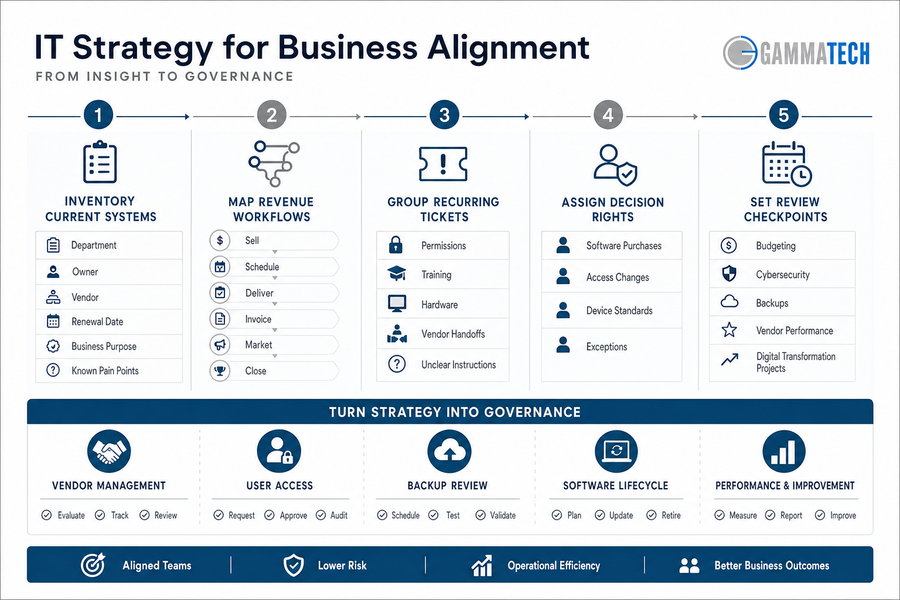
Creating An IT Strategy For Business Alignment

Organizational change is difficult because finance, operations, field teams, marketing, and vendors experience the same systems differently. A project manager cares about job files and deadlines. Finance cares about invoice accuracy. Marketing cares about campaign data and lead handoffs.

A business IT strategy must move from discussion to documented ownership, with enough flexibility to fit how work already happens. For example, 93% of executives say AI sovereignty must be factored into their 2026 business strategy, while 53% expect AI to transform business models in their industry by 2030.

  • Inventory current systems: List department, owner, vendor, renewal date, business purpose, and known pain points for each platform.

  • Map revenue workflows: Document how work is sold, scheduled, delivered, invoiced, marketed, and closed.

  • Group recurring tickets: Sort issues by root cause, such as permissions, training, hardware, vendor handoffs, or unclear instructions.

  • Assign decision rights: Define who approves software purchases, access changes, device standards, and exceptions.

  • Set review checkpoints: Review budgeting, cybersecurity, backups, vendor performance, and digital transformation projects on a set schedule.

The next step is turning those decisions into governance people can use, including vendor management, user access, backup review, and software lifecycle planning.

Build Strategy Into Daily IT

Documenting A Business IT Strategy People Can Follow

An undocumented plan fails when approvals depend on memory, vendor commitments live in email, or employees do not know where to submit requests. Details prevent delays.

Good documentation makes an IT strategy for business easier to execute because it gives managers, employees, vendors, and the IT partner the same reference point. It improves troubleshooting, timeline setting, cost estimates, and implementation steps because the service team can see the role, system, approval path, and business impact before work begins.

  • Governance calendar: Schedule periodic reviews for renewals, budgets, security reviews, backup tests, and major project status.

  • Request intake rules: Define how employees request software, new users, access changes, devices, marketing tools, or support.

  • Escalation and approval paths: Specify who approves cost, risk, customer impact, and exceptions when a request falls outside normal rules.

  • Service expectations: Clarify internal response priorities, vendor responsibilities, and what the IT partner should handle.

What this looks like in practice: A new hire should receive access to email, accounting software, CRM, job files, project tools, shared drives, and security groups before day one. Documentation organized by users and roles makes that request easier to approve, fulfill, and verify.

Clear documentation leads to better support outcomes and fewer preventable interruptions.

Turn Your IT Strategy Into Daily Action

Gamma Tech Services helps align systems, ownership, and workflows so your IT plan supports real operations, not just documentation.

Book a Consultation

Make Your IT Business Strategy Easier To Execute

A clear plan turns technology decisions into documented priorities, cleaner ownership, better support, stronger data habits, and lower operational confusion across approvals, tickets, invoices, and customer handoffs.

If you want help reviewing priorities, documenting the plan, and building an IT approach that supports how your business actually operates, contact Gamma Tech Services for IT Strategy services and support. We bring a warm, personable planning approach backed by careful troubleshooting and implementation detail, with support for small business, mid-sized business, enterprise, marketing IT, and digital transformation needs.

Our 20-year track record in the area and 99 percent customer retention rate over the past five years reflect the way we work: practical, attentive, and focused on the systems and workflows your team depends on every day. Contact us today.

Explore IT Consulting Solutions Near You

Gamma Tech · Southwest Florida

IT Strategy Template: Turn Reactive IT Into A Clear Operating Plan

Listen on Amazon MusicListen on Apple Podcasts

Cloud systems keep expanding, users move between remote and on-site work, vendors multiply, helpdesk tickets pile up, cybersecurity approvals wait in inboxes, and budget decisions still need one coordinated plan. A practical IT strategy example should reduce reactive work for the people handling access requests, invoices, device issues, and vendor escalations every week.

At Gamma Tech Services, our planning stays close to those workflows because useful plans make decisions easier before tools are purchased. Strong IT strategy examples connect daily support realities to long-term maturity and give your team clearer control over what to approve, patch, monitor, escalate, and resolve.

Bradd Konert, President of Gamma Tech Services at Gamma Tech Services, notes: "Start by mapping who requests access, who approves spend, and who resolves tickets, because unclear ownership turns simple technology decisions into recurring operational delays."

Talk with our team

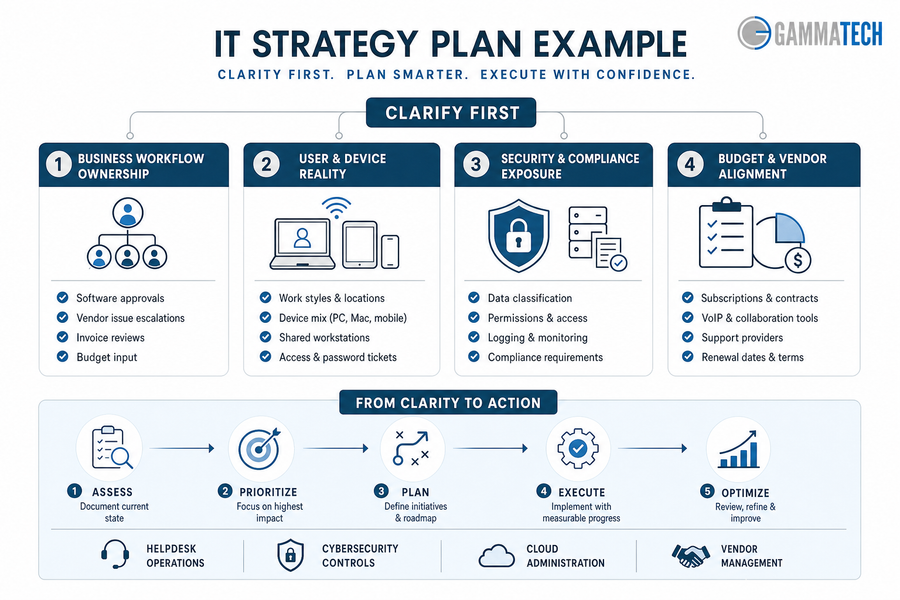
What An IT Strategy Plan Example Should Clarify First

Clarity comes before tool selection, vendor changes, or budget approval. When ownership is vague, a routine software renewal becomes a finance question, a security exception waits for approval, and a helpdesk ticket stays open while staff work around the problem.

That discipline matters when technology spending faces outside pressure, including IDC research showing that over 30% of IT leaders named geopolitical impact on tech budgets as the primary risk.

  • Business workflow ownership: Document who approves software, escalates vendor issues, reviews invoices, and gives budget input when a router, firewall, or cloud renewal is due.

  • User and device reality: Review how people actually work, including shared workstations, field tablets, personal mobile devices, Mac users, and recurring access tickets.

  • Security and compliance exposure: Identify where patient data, customer records, project files, and financial reports need stronger permissions, logging, and approval steps.

  • Budget and vendor alignment: Review subscriptions, contracts, VoIP tools, support providers, cloud platforms, network equipment, and renewal dates before costs drift.

Once these basics are documented, planning moves from opinion to prioritized action. The next layer is helpdesk operations, cybersecurity controls, cloud administration, and vendor management.

An IT Strategy Roadmap Example For Operational Maturity

A roadmap turns priorities into sequenced decisions, not a long wish list. The right order depends on users, software, vendors, risk profile, and internal capacity, so you should adjust an it strategy roadmap example as conditions change.

A construction firm may need field tablets connected to project files, VoIP, cloud storage, and jobsite connectivity before a superintendent can approve change orders on schedule. If permissions, mobile device settings, and vendor applications are not documented, helpdesk tickets rise and project managers wait for file access. A clinic faces a similar issue when scheduling and billing systems need secure access for front desk staff, providers, and billing teams.

Sequencing matters because every phase affects the next. Stabilize support first, then document vendors and systems, strengthen cybersecurity controls, modernize cloud and workflow tools, and review budget and ownership with the people who approve spend and depend on uptime. We plan this way because a roadmap has to reflect real software, real vendors, and the capacity available to assess, configure, monitor, and adjust.

A Technology Strategy Example Tied To Business Impact

Technology strategy should reduce measurable friction in daily operations, not simply add platforms. A strategic IT plan connects support, security, vendors, cloud systems, and implementation work to the moments where staff lose time, customer response slows, or risk increases.

  • Fewer recurring support tickets: Document device standards, patch schedules, and helpdesk routing so a printer issue, laptop failure, or software access request reaches the right technician faster.

  • Cleaner access control decisions: Role-based access, onboarding, offboarding, and manager approvals reduce exposure when employees change roles or leave with cloud accounts still active. The practical question is simple: who approves access, who removes it, and where is that decision recorded?

  • Better vendor accountability: Vendor management ties renewals, invoices, licensing, contract terms, and support escalation to one review process instead of leaving deadlines buried in scattered emails.

  • Stronger cybersecurity readiness: Managed firewall, endpoint protection, anti-phishing, mobile device security, ransomware protection, penetration testing, and network monitoring work best when configured around real users and data.

  • More reliable cloud operations: Cloud security, backups, VoIP, network performance, and remote access directly affect uptime, call quality, and staff productivity. IBM reports that 63% of more advanced organizations report effective strategy execution, compared to 46% of less advanced organizations.

Operational Signal to Track

System or Data Source

Owner

Practical Decision It Supports

Repeat tickets from the same department, device model, or application within 30 days

PSA/helpdesk platform, endpoint management logs, knowledge base search reports

Service Desk Manager

Update laptop standards, rewrite a setup article, or change ticket routing for payroll, CRM, or printer issues

Inactive users with active Microsoft 365, VPN, or finance system access

Identity provider, HRIS termination feed, access review exports

IT Security Lead and HR Operations

Trigger offboarding remediation before audit findings or unauthorized data access occur

Licenses paid but unused for 60+ days

SaaS admin consoles, renewal calendar, accounts payable invoice records

Vendor Manager or IT Operations Lead

Reduce renewal scope, reclaim seats, or renegotiate contract terms before the next invoice cycle

Endpoints missing current protection policy or failing ransomware rollback checks

EDR dashboard, MDM platform, vulnerability scanner

Cybersecurity Analyst

Prioritize patch deployment, isolate risky devices, or schedule targeted user training

Cloud backup failures, VoIP jitter, or remote access latency during business hours

Cloud backup console, network monitoring platform, firewall/VPN logs, VoIP call quality reports

Network and Cloud Operations Team

Adjust bandwidth, repair backup jobs, tune firewall rules, or escalate to the ISP or cloud provider

it strategy plan example

Build Your IT Operating Plan

How An IT Strategy Template Becomes Daily Execution

Change is difficult because each department depends on different tools, vendors, approval paths, and support expectations.

IT strategy examples become useful only when the working document assigns ownership, timing, budget, risk level, and the next review date, especially as Forrester reports 86% of tech leaders expect increased budgets from the year before despite uncertainty.

  • Inventory systems, users, devices, cloud platforms, network equipment, VoIP, and critical vendor applications, including who uses them and who approves changes.

  • Map recurring tickets to root causes such as permissions, outdated devices, poor documentation, weak Wi-Fi, or vendor response delays.

  • Assign owners for patch management, access approvals, renewals, security reviews, backups, and escalation paths when systems fail or deadlines approach.

  • Review the roadmap quarterly with business leaders, finance, department heads, and IT support partners, supported by vCIO or Technical Account Manager guidance when planning accountability needs a consistent owner.

The template is not paperwork; it creates decision discipline.

Build Your IT Operating Plan

Turn your IT strategy example into practical priorities for support, security, vendors, and budgets with Gamma Tech Services.

Book a Consultation

Using Examples Of IT Strategy To Decide What Changes Next

Examples help you compare options, but the final plan must reflect actual users, devices, workflows, vendors, and risk. A useful IT strategy example also accounts for new spending pressures, such as IBM reporting AI investment has grown to about 12% of IT spend in 2024.

  • Stabilize what breaks: Prioritize outages, recurring tickets, slow networks, unresolved escalations, and poor vendor response that interrupt billing, scheduling, jobsite coordination, or customer handoffs.

  • Secure what matters: Focus on customer data, employee accounts, mobile devices, firewall rules, endpoint protection, and cloud access before adding more applications.

  • Plan what grows: Connect digital transformation, marketing IT services, enterprise IT services, and healthcare or construction software support to future staffing, sites, and capacity.

Plain language helps planning stay usable for the people approving changes, the staff opening tickets, and the vendors responsible for resolving them. Long-term IT strategy, technology implementation, cybersecurity planning, and cloud support all need clear owners, timelines, and approval paths.

Build Your Strategic IT Plan With Gamma Tech Services

A practical technology strategy example turns planning into clearer ownership, stronger security, better vendor control, and fewer operational surprises across tickets, approvals, invoices, cloud access, and support escalation.

With our 20-year track record, personable service, flexible planning, and careful follow-through, we connect IT strategy, cybersecurity, cloud, helpdesk, vendor management, and long-term roadmapping to the way work actually gets done.

If you are ready to move from scattered technology decisions to a coordinated plan, contact Gamma Tech Services to review current IT priorities and build a plan that fits the way the business actually works.

Explore IT Consulting Solutions Near You

Gamma Tech · Southwest Florida

IT Helpdesk Best Practices That Keep Daily Operations Moving

Listen on Amazon MusicListen on Apple Podcasts

For executives managing approvals, tickets, customer commitments, vendors, compliance, and workforce productivity, the helpdesk is no longer a back-office queue. It is an operational control point.

The data supports that shift: 86% of service teams say a help desk system increases productivity, which is why IT helpdesk best practices now affect daily throughput, not just technical response. Small delays compound across invoices, access requests, field updates, and customer follow-through.

Bradd Konert, President of Gamma Tech Services, notes: "A strong helpdesk gives leaders a clearer view of where work is slowing down, who owns the next step, and which issues need a process fix instead of another one-off repair."

Use A Helpdesk Process Your Team Can Actually Rely On

Improve ticket visibility, strengthen accountability, and keep approvals, users, vendors, and business workflows moving without avoidable delays.

Learn More

Talk with our team

IT Helpdesk Best Practices That Protect Daily Operations

Executives should treat the helpdesk as an operating control because poorly managed tickets slow approvals, interrupt revenue-facing work, and leave managers without reliable status. When well-documented systems reduce troubleshooting by 40-60%, the business value is clear: better documentation protects time, consistency, and accountability.

  • Ticket ownership clarity: Every ticket needs a named owner. If an accounts payable user cannot access invoice approvals, unclear ownership creates duplicate tickets, repeated follow-ups, and manual manager intervention.

  • Response priority rules: Priority rules protect revenue-impacting work, field teams, clinical workflows, and customer-facing systems by making business urgency visible.

  • User communication standards: Consistent updates reduce duplicate tickets and reassure employees that the issue is moving through a defined process.

  • Recurring issue review: Repeat tickets should feed process improvement, vendor escalation, training, or system changes when the same issue keeps draining time.

How An IT Helpdesk Best Practice Improves Service Accountability

Before a leadership meeting, a business leader reviews unresolved tickets and sees the pattern: users are waiting, managers lack status, and vendors have not responded clearly. A disciplined ownership and escalation process turns that uncertainty into accountability, especially when help desks resolve approximately 70% of issues at first contact and route the rest to specialist teams.

A strong IT helpdesk best practice defines who owns the ticket, when it escalates, what information must be captured, and how status moves between users, managers, vendors, and IT. That matters when a construction project manager cannot access updated plans before a subcontractor meeting, or when a healthcare office is waiting on software access before the next appointment block.

In both cases, "in progress" is not enough. Leaders need ownership, escalation timing, and a clear next action tied to work already in motion. We see stronger outcomes when support combines careful troubleshooting with personable service: users provide better context, technicians ask better questions, and managers get cleaner status without chasing every handoff.

IT helpdesk best practices

IT Helpdesk Category Best Practices Improve Prioritization When They Reflect Real Workflows

Categories are not administrative labels. They determine routing, reporting, resource planning, and leadership visibility. When 70% of customers expect any agent or employee they engage with to have full context of their situation, poor categorization becomes a service failure, not a filing issue.

Strong IT helpdesk category best practices should reflect real workflows. For a construction firm, "application issue" is too broad if the delay involves plan files, field tablets, or project management software. For a healthcare office, access management, patient scheduling software, and vendor-supported clinical applications need separate visibility.

We build categories around how tickets, approvals, devices, vendors, and users actually move through the business. The leadership question is practical: what would your helpdesk need to show if the business added locations, expanded services, or changed approval requirements?

Operational Scenario

Category Design Decision

Primary Owner

Evidence to Capture

Leadership Signal Created

New regional office opens with 80 employees using Microsoft 365, VPN, printers, and badge access

Create location-specific subcategories under network, endpoint, facilities handoff, and identity requests

IT Service Desk Manager with Regional Operations Lead

Site code, affected floor, device asset tag, ISP circuit ID, employee department

Shows whether growth is creating repeat incidents at a specific site or vendor dependency

Sales team reports repeated Salesforce login and permissions issues after territory changes

Separate identity provisioning from application role configuration to prevent false escalation

IAM Analyst and Salesforce Administrator

User role, profile name, territory assignment, SSO error code, approval trail

Reveals whether delays come from access approvals, CRM configuration, or directory sync failures

Quarterly onboarding volume doubles after acquisition of a smaller company

Use lifecycle categories tied to HRIS triggers, equipment fulfillment, software licensing, and security training

HR Operations, Endpoint Team, and Security Awareness Lead

Workday start date, manager approval, laptop shipment tracking, license pool availability

Identifies bottlenecks before missed start dates become department-level productivity loss

Third-party payroll platform outage affects finance deadline

Classify as vendor service disruption with business-process impact, not a generic application ticket

Vendor Manager and Finance Systems Owner

Vendor case number, SLA tier, payroll run deadline, affected employee count

Quantifies external supplier risk and supports contract review or escalation decisions

Departing employee retains access to shared cloud folders after termination date

Track offboarding by access removal type, data ownership transfer, and exception approval

Security Operations Analyst and HR Business Partner

Termination timestamp, Google Workspace groups, shared drive owner, legal hold status

Surfaces compliance exposure and confirms whether access controls scale with headcount changes

Keep Your Helpdesk Running Smoothly

How Helpdesk Best Practices Improve Ticket Resolution And Business Performance

Better helpdesk execution changes measurable outcomes, including service levels, vendor performance, labor productivity, and audit readiness. Teams that follow disciplined help desk practices see meaningful gains, with organizations implementing best practices reporting a 35% improvement in customer satisfaction.

  • Faster user productivity recovery: Timely resolution reduces downtime for employees who depend on systems to complete payroll, billing, project work, clinical coordination, or customer response.

  • Cleaner escalation decisions: Clear rules prevent tickets from sitting with the wrong technician, approver, or vendor until a deadline or customer commitment has already been missed.

  • Stronger vendor performance visibility: Categorized tickets and documented handoffs reveal recurring issues with an application, device, carrier, or software provider, giving leadership evidence for vendor reviews and contract discussions.

  • Better audit trail quality: Documented ticket activity shows who requested access, who approved it, what changed, and when the work was completed. This protects audit readiness for access changes, terminations, shared files, and regulated workflows.

  • More reliable budget planning: Recurring ticket patterns help leaders separate training gaps, process defects, vendor weaknesses, and aging technology investments.

Building Helpdesk Best Practices Into Daily Team Workflows

Changing helpdesk behavior is difficult because users, managers, vendors, and technicians already have habits for reporting problems and chasing updates. The work becomes easier when teams treat workflow design as a business process, especially since 80% of support agents say better access to other departments' data would improve their ability to serve customers.

  • Define priority levels in business terms, such as payroll blocked, project deadline at risk, customer response delayed, or clinical workflow interrupted.

  • Create ticket intake standards that require system name, user impact, urgency, screenshots where relevant, and approval of the owner.

  • Review recurring issues monthly with operations, finance, HR, or department leaders when patterns affect productivity or risk.

  • Assign category owners for access, devices, applications, vendor issues, security concerns, onboarding, and offboarding, then adjust those categories as workflows change.

We often adapt these workflows around how a client actually works, because a rigid process fails when it ignores approval chains, software dependencies, and department responsibilities. That flexibility matters in healthcare and construction environments where software access issues, jobsite device failures, or vendor delays affect schedules, service commitments, and compliance expectations.

Talk With Gamma Tech Services About Stronger Helpdesk Operations

Disciplined helpdesk practices improve ticket flow, accountability, reporting, user productivity, and leadership visibility. Strong teams often maintain high customer satisfaction scores when service quality is measured consistently.

At Gamma Tech Services, we bring a warm, practical approach supported by careful troubleshooting and a 20-year local track record. Our client relationships are built on steady service, clear expectations, and flexible processes that fit real workflows, including healthcare and construction software environments. We also use a per-user service model rather than a per-endpoint approach, aligning support with the people who need work to keep moving.

Our 97% customer retention rate over the past five years and more than 200 Google reviews with an average rating of 5 stars reflect that service standard. Contact us for a practical conversation about strengthening helpdesk operations around your people, approvals, vendors, and business priorities. Contact us today.

Explore IT Helpdesk Solutions Near You

Gamma Tech · Southwest Florida

IT Support Vs Helpdesk: Clear Ownership For Tickets, Access, And Uptime

Listen on Amazon MusicListen on Apple Podcasts

Growing businesses cannot afford vague support ownership when approvals, access, devices, vendors, and line-of-business systems are tied to daily revenue.

The distinction between IT support and help desk ownership matters now because support expectations are rising as the global help desk support segment is projected to grow from USD 5,547.0 million in 2025 to USD 11,325.0 million by 2033.

Bradd Konert, President of Gamma Tech Services, notes: "The issue is not terminology alone. Leaders need a support model that protects uptime, user productivity, security, and operational maturity without leaving accountability unclear."

Build A Support Model Your Team Can Actually Rely On

Reduce recurring disruptions, clarify ownership, and connect helpdesk, IT support, and service desk decisions to your business workflows.

Learn More

Talk with our team

IT Support Vs. Helpdesk In Everyday Business Operations

Leaders should define the support model before judging response times, ticket volume, or vendor performance. The wrong structure turns routine issues into workflow delays: invoices sit unfinished, field updates arrive late, approvals stall, and managers lose time chasing ticket status.

User expectations also show why channel and ownership matter: 82% of customers want a more human interaction in their support experience, which applies when employees are blocked by access, software, or device issues.

  • Helpdesk handles immediate friction: A helpdesk resolves password resets, basic software problems, printer issues, and device questions so employees can get back to work quickly.

  • IT support owns continuity: Broader IT support includes planning, prevention, systems administration, cybersecurity coordination, backups, vendor management, and business continuity.

  • Users are the business lens: Our per-user service view focuses on whether each person can perform their job across devices, applications, and workflows, not just how many endpoints appear on a list.

  • Patterns deserve escalation: Repeated login problems, recurring application errors, and slow vendor responses signal that a ticket queue needs deeper ownership, not only faster closure.

Helpdesk Vs. IT Support Matters When Tickets Start Shaping Your Day

A field manager waiting on device access, an accounting team blocked from invoicing, or a clinical office waiting on software permissions does not experience IT as a department label. They experience delayed approvals, missed job updates, slower patient workflows, and weaker customer responses. That is why phone support remains relevant for complex issues, with 69% of consumers still preferring it for certain problems because they need a human touch.

  1. Response ownership must be clear. Every ticket needs an owner when the issue affects billing, scheduling, clinical access, or customer response time.

  2. Escalation paths need discipline. Frontline support should know when to move an issue to deeper technical support instead of repeatedly trying the same fix.

  3. Recurring issues require analysis. A password reset is routine once; repeated access failures point to permissions, identity controls, training gaps, or application configuration.

  4. Vendors need active coordination. Software providers, internet carriers, copier vendors, and cloud platforms should not leave managers chasing disconnected updates.

  5. Leadership needs decision visibility. Executives need to see which systems, teams, and vendors are creating delays so they can approve fixes based on operational impact.

IT support vs. helpdesk

Helpdesk Vs. Service Desk As Your Company Matures

A basic helpdesk function answers user issues; a more mature service desk approach manages requests, approvals, documentation, and accountability across the business.

The practical difference in helpdesk vs. service desk shows up when support becomes tied to onboarding, compliance, software permissions, and workflow protection, especially in industries where voice support remains the top choice in healthcare at 63%, financial services, and other trust-heavy environments.

What this looks like in practiceWhen a construction firm hires a new estimator, support is not just a laptop request; it includes estimating software access, job file permissions, email groups, printer mapping, and vendor licensing. In a healthcare office, provisioning clinical software access also needs role-based permissions, timing discipline, and documentation so patient workflows are not disrupted.

Because we support and administer software for healthcare and construction businesses, we see how mature service desk practices depend on industry context. The request record needs enough detail for the next person to act: user, location, system, urgency, approval status, deadline, and business impact. Without that structure, the same access or software issue restarts from zero each time, and managers keep losing time to status checks that should already be visible.

Operational Scenario

Service Desk Control Added

Required Handoff or Approval

Business Risk Reduced

New healthcare billing coordinator needs EHR, clearinghouse, and shared drive access before Monday clinic hours

Role-based access template with audit notes for each system provisioned

Practice manager approves EHR role; IT confirms MFA enrollment and access expiration rules

Incorrect patient data exposure, delayed claims submission, and undocumented permissions

Construction project manager moves from one jobsite to another with different file shares and plan software needs

Jobsite transfer workflow covering permissions, printer mapping, VPN profile, and license assignment

Operations manager validates project assignment; software admin reclaims unused licenses

Access to old bid files, field reporting delays, and wasted specialty software seats

Accounts payable team reports intermittent scanning failures during invoice processing

Known-error record linking scanner model, driver version, finance application, and tested fix

Finance lead confirms processing deadline; IT documents vendor escalation outcome

Duplicate troubleshooting, missed payment cycles, and recurring interruption during month-end close

Clinical workstation replacement is needed in an exam room used for patient intake

Change window planning with device image checklist, peripheral testing, and rollback steps

Office administrator approves downtime; technician verifies EHR login, label printer, and scanner function

Interrupted patient flow, incomplete intake records, and avoidable after-hours remediation

Estimator cannot open takeoff files after a construction software update

Application support path that captures version, project file type, license status, and vendor case number

Estimating manager sets bid-deadline priority; software vendor receives logs and sample file

Missed bid submission, unsupported workarounds, and loss of issue history across projects

Related IT Support Guides

Clear IT Support And Helpdesk Roles Strengthen Your Operating Model

How can clearer support roles help your business scale without adding avoidable delays?

Ticket triage, user access, system administration, vendor coordination, and security oversight all need defined ownership. That clarity matters because the labor market is expanding unevenly: BLS data cited by Spiceworks projects information security analyst roles to grow 33% between 2023 and 2033, while user support specialist roles grow at a much slower rate and network administrator roles contract.

Leaders should assign accountability based on business impact, not technical labels. Frontline support can handle routine user needs, deeper technical support can resolve system-level problems, security oversight can protect access, and business system owners can approve workflow changes. The model should show who receives the ticket, who approves the change, who communicates with the user, and who decides when a recurring issue becomes a business risk.

  • Approvals need clean routing: Software requests, permission changes, and purchasing decisions should move through known approvers before support implements changes.

  • Onboarding needs one plan: New users need devices, accounts, applications, permissions, MFA, printers, and training aligned before their start date.

  • Offboarding needs control: Departing users should lose access promptly across email, cloud apps, shared files, industry software, and vendor portals.

  • Recurring incidents need ownership: Repeat tickets should trigger root-cause review, cyber hygiene checks, vendor escalation, or workflow adjustment.

Helpdesk Or IT Support Decisions That Affect Risk And Cost

Changing your support structure affects habits, budgets, responsibilities, and expectations across departments, so leaders should define the operating model before changing vendors or internal processes. This matters in local labor markets as well; in 2024, South Carolina employed 10,510 computer user support specialists, which reinforces that support capacity is an operational planning issue, not just a technical preference.

  • Map ticket types by workflow: Separate password resets, application issues, device failures, vendor problems, security alerts, onboarding tasks, and approval requests.

  • Identify repeat disruptions: Look for tickets that return weekly or monthly, especially those tied to invoicing, scheduling, scanning, job management, or clinical workflows.

  • Clarify escalation rules: Define when frontline support escalates, who owns the next step, and how managers receive status updates.

  • Review access controls: Confirm onboarding and offboarding steps for email, cloud apps, shared files, MFA, industry software, and vendor portals.

  • Evaluate pricing against users: A per-user service model helps executives evaluate support around real people and workflows rather than counting devices alone. If one employee uses a laptop, mobile device, shared applications, and vendor portals to complete a role, the question is whether that person can work without avoidable interruption.

Choosing Support That Fits How Your Team Works

The right distinction helps you improve response quality, reduce recurring disruption, clarify accountability, and support growth with fewer operational surprises. Review your current model against the work employees perform every day: who approves access, who fixes a failed invoice export, who coordinates with the software vendor, and who tells managers when a recurring issue needs a permanent fix.

At Gamma Tech Services, we bring a warm, practical service style backed by a 20-year local track record, a 97% customer retention rate over the past five years, and more than 200 Google reviews averaging 5 stars. As a family-owned team, our technicians and account managers focus on helping clients feel understood, not processed.

We also avoid charging new clients for both onboarding and the first month of service within the same month, so the transition can be planned with care. If you want clearer ownership across help desk, IT support, and service desk workflows, we can help you assess the model in operational terms. Contact us today.

Explore IT Helpdesk Solutions Near You

Gamma Tech · Southwest Florida

IT Procurement Best Practices That Stop Delays, Tool Sprawl, And Renewal Waste

Listen on Amazon MusicListen on Apple Podcasts

The myth is that procurement slows the business. Poor coordination does. A purchase request should not sit in limbo because hardware, software, licensing, approvals, vendor terms, and security reviews are moving through separate conversations.

That is how a new estimator waits on a laptop, a clinic delays onboarding, duplicate tools enter budgets, and risk appears after users already depend on the system. With small businesses planning 2025 budget increases across 48% laptops, 47% security solutions, and 43% AI tools, IT procurement best practices need to fit how your teams approve, buy, deploy, and support technology.

Bradd Konert, President of Gamma Tech Services, notes: "Procurement works when it matches the real path of the request: who needs access, who approves cost, who checks security, who deploys the tool, and who supports the user after go-live. If any one of those steps is informal, the business pays for it in delayed tickets, duplicate licenses, avoidable renewals, or unclear vendor responsibility."

Build an IT Procurement Process That Prevents Costly Delays

Align approvals, vendor oversight, licensing, and deployment workflows before purchases create support gaps, risk, or wasted spend.

Learn More

Talk with our team

How IT Procurement Best Practices Reduce Approval Delays and Tool Sprawl

Procurement discipline is not paperwork. It affects approval speed, budget control, and user productivity because every unclear handoff becomes a delayed ticket, a shadow purchase, or a rushed deployment IT has to clean up later.

Industry research shows 64% say procurement's influence is growing, so executives need a clearer view of who is buying what, why it matters, and how it will be supported.

  • Approval paths drift: No owner between department need, finance approval, IT review, and vendor terms creates workarounds.

  • Renewals go unnoticed: Auto-renewals keep underused tools in the budget when contract dates live in inboxes.

  • Licenses outpace need: A per-user view exposes inactive users, duplicated permissions, and unnecessary subscriptions.

  • Security reviews arrive late: When IT reviews permissions after purchase, deployment slows and access rules stay unclear.

In healthcare, a patient portal add-on needs data access, vendor support, and staff permissions reviewed before invoice approval. In construction, a jobsite device rollout affects estimators, project managers, accounting, and field crews. We use a per-user service model because it connects software access, support needs, and cost control to the people actually using each system.

IT Procurement Best Practice Starts With Aligning Spend to How Employees Actually Work

Are your technology purchases tied to what each role actually needs to do the job, or are they approved because a department asked for another tool?

Procurement is not an IT-only function. Finance sees the invoice, operations feels the delay, department leaders own adoption, and IT handles access, support, and security. In many organizations, procurement professionals spend up to 70% of their time on transactional activities, leaving too little time to challenge whether a purchase matches real work requirements.

  • Role-based access needs: Define who needs the license, permissions, devices, and support.

  • Workflow dependency mapping: Review the impact on accounting, operations, customer service, field teams, compliance, and reporting.

  • Support burden review: Account for tickets, password resets, training, vendor coordination, and escalations.

  • Renewal and exit terms: Give finance and IT visibility into dates, notice windows, data export terms, and cancellation limits.

A per-user view keeps the decision close to the employee doing the work. It helps leaders question whether the next license request supports an active need, a temporary project, or a tool that should be retired before the next invoice.

it procurement best practices

Best Practices in IT Procurement that Protect Security and Compliance Controls

A department finds a tool, gets pricing, and pushes for approval before IT reviews permissions, data storage, vendor access, or support obligations. The purchase feels efficient until deployment stalls, customer records sit under unclear access rules, or support was never included.

Best practices in IT procurement must connect the purchase decision to controls, data flows, and ownership before signature, especially when only 21% of businesses considered cyber security to a large extent when purchasing software.

  1. Define purchase ownership early: Identify who approves the business need, cost, security review, deployment plan, and ongoing support.

  2. Review vendor data access: Confirm what data the vendor handles, where it is stored, who can access it, and how access is removed.

  3. Check integration requirements: Review the impact on accounting systems, ticketing, customer records, scheduling platforms, project systems, and reporting.

  4. Document support responsibilities: Clarify whether internal IT, the vendor, or our managed services team owns troubleshooting, user changes, updates, and escalation.

  5. Plan offboarding before buying: Define how users are removed, data is exported, records are retained, and contracts are exited.

More IT Planning Insights

IT Procurement Process Best Practices for Cleaner Renewals and Better Vendor Accountability

Your renewal calendar, ticket history, license usage, and contract terms are the evidence leaders should review before approving another year of spend. If those records are scattered across inboxes, invoices, and vendor portals, your team negotiates from memory instead of facts.

The right IT procurement process best practices give finance, operations, and IT a shared view of value before notice windows close, especially when structured procurement tools are associated with a 30% reduction in IT procurement costs.

  1. Build a renewal calendar: Track owner, renewal date, cost, notice window, and affected system.

  2. Use ticket history: Recurring issues should influence vendor performance reviews.

  3. Measure actual usage: Review active users, inactive accounts, duplicated tools, and role fit.

  4. Clarify escalation paths: Define who contacts the vendor, updates users, and owns resolution.

Renewal Review Signal

Operational Evidence to Pull

Role That Should Validate It

Decision It Can Support

Service reliability concern

Zendesk or ServiceNow incidents tagged to the application, outage timestamps, vendor response notes, and SLA breach records

IT service manager with input from the business system owner

Request service credits, require a support improvement plan, or delay renewal approval until open defects are resolved

License-role mismatch

Admin console exports showing assigned license tier, last login date, department, and job function from Okta or Azure AD

SaaS administrator and finance analyst

Downgrade premium seats, remove dormant users, or move teams to a shared-license model where permitted

Duplicate platform coverage

Application inventory comparing overlapping features, integration dependencies, and department-level spend from Coupa or NetSuite

Procurement lead with operations leadership

Consolidate vendors, retire a redundant tool, or negotiate volume pricing with the retained provider

Customer-facing workflow risk

CRM, helpdesk, or billing process maps showing where the vendor system supports onboarding, support response, invoicing, or reporting

Revenue operations manager or customer support director

Prioritize continuity planning, require implementation support, or approve renewal despite higher cost due to operational dependency

Contract control gap

Master service agreement clauses for auto-renewal, data export rights, termination assistance, audit rights, and price increase caps

Legal counsel and procurement manager

Negotiate revised terms, add notice protections, or create an exit plan before the next renewal cycle

IT Procurement Support Should Connect Finance Aapprovals, Operational Need, and IT Risk Before a Purchase is Made

Finance approves an invoice, operations needs the tool deployed, and IT discovers too late that security details, support terms, or access requirements were never reviewed. That is an ownership problem with budget, workflow, and risk consequences.

Changing procurement behavior is difficult because approvals, budgets, vendor relationships, and user expectations are distributed across teams. It becomes harder when privacy expectations rise; 82% of companies consider privacy certifications such as ISO 27701 when selecting vendors in their supply chain.

  • Create intake standards: Require purpose, users affected, system access, data handled, cost, and deadline.

  • Assign decision owners: Name finance, IT, the department leader, and the executive approver.

  • Review support impact: Check deployment effort, help desk volume, training, vendor escalation, and internal ownership.

  • Audit active licenses: Compare users, roles, renewals, and actual usage.

  • Set renewal checkpoints: Review value before notice windows close.

We favor procurement workflows that fit your approval structure rather than forcing a rigid process onto teams with real work waiting. Our role is not to add another approval layer. It is to help you make the right purchase before it becomes a support ticket, renewal dispute, compliance concern, or budget surprise.

Talk Through Your Next Technology Purchase With Us

Disciplined procurement gives your team fewer delayed approvals, cleaner renewals, better cost visibility, clearer support ownership, and lower operational risk. If you are evaluating a tool, renewal, license change, or vendor agreement, talk with Gamma Tech Services before the decision is locked in.

We support the tickets, user changes, onboarding steps, vendor handoffs, and system access decisions that follow the purchase. Our per-user service model helps you review spend around the people who need technology to do their jobs, not just the endpoints attached to the network.

For healthcare and construction teams, that detail matters. A practice management add-on, jobsite device rollout, accounting integration, or project platform renewal can affect approvals, files, customer records, and field access at the same time. With 20 years of local experience, more than 200 Google reviews averaging 5 stars, and 97% customer retention over the past five years, we help you sort those details before small procurement misses become daily operational friction. Contact us today.

Explore IT Consulting Solutions Near You

Leave the tech to us.

Contact Our Team